
 Shutdown and Restart of the Whole J2EE Engine
Cluster
Shutdown and Restart of the Whole J2EE Engine
Cluster

Purpose
Apart from starting, monitoring, and stopping a single J2EE instance using the startup framework, you can also shut down or restart the whole J2EE Engine cluster from one client. This is done through the message server communication of JControl.
Process Flow
The figure below shows the process the flow of the actions that the Java startup and control framework executes:
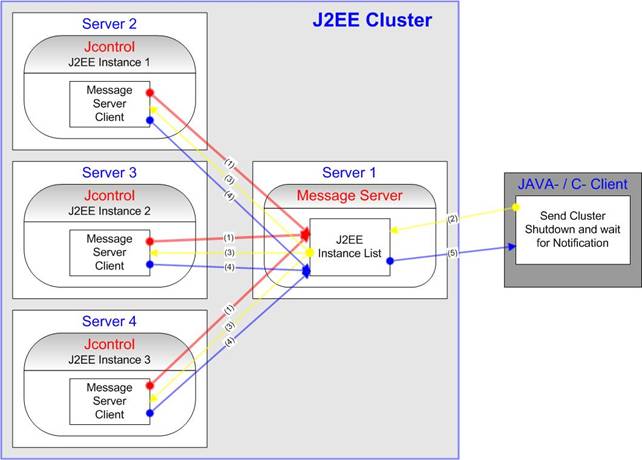
Shutdown of the J2EE Engine Cluster
Stopping the J2EE Engine cluster consists of the following steps:
· Each JControl program, which is responsible for aJ2EE instance, connects to the message server and registers the instance inside the J2EE instance list of the message server (1).
· JControl waits for notifications from the message server.
· The message server clients send the cluster shutdown command to the message server (2).
· The message server distributes the shutdown command to each registered JControl program (3).
· The JControl programs receive the shutdown command and stop the instances.
· After all J2EE nodes are stopped, JControl sends the stopped notification back to the client (4 and 5).
Restart of the J2EE Engine Cluster
The steps are similar to the shutdown scenario:
· The client sends the start command to the message server.
· The message server distributes the start command to the connected JControl programs.
· JControl receives the start command and starts all J2EE nodes of the instances.
· JControl sends the started notification back to the client.