
 Connecting a Company-specific Backend System
via Room Extensions
Connecting a Company-specific Backend System
via Room Extensions

A common scenario to connect a backend system, is to create a room-specific resource (folder) together with a room, to operate on that resource during the room’s life cycle and to delete it with the room. This can be achieved with Room Extensions.
Connecting a backend system to your rooms includes the following steps:
...
1. Implementation of an extension, that maintains the backend data according to the rooms life cycle
2. Implementation of an iView, that visualizes the backend data in the room
3. Configuration of the dataflow between the iView and the extension (in the room or room part template)
Example
Implementation of an extension
SAP delivers the CM Room Extension, which can be used as an example for the above mentioned scenario. The purpose of this extension is to maintain a folder in the CM backend system. It also links the folder into a structure that allows browsing all folders of a room. The extension can be used for rooms as well as for room parts.
To maintain the folder according to the room’s life cycle, the extension implements code for different steps in the life cycle. These steps are called extension points:
●
ON_CREATE_ROOM
The CM Room Extension creates a folder in a configured parent folder, copies initial content to that folder, grants full access for the room main group and adds this group to the owner groups of the folder. It also grants read access for the group “Everybody”, if access “Public” is configured. Finally it adds a folder link to the room structure.
●
ON_DELETE_ROOM
The CM Room Extension removes the folder link from the room structure and deletes the folder.
●
ON_CREATE_ROOMPART
The CM Room Extension creates a folder in the configured parent folder, copies the initial content to that folder and grants read access to the group “Everybody”, if access “Public” is configured.
●
ON_ADD_ROOMPART_TO_ROOM
The CM Room Extension grants full access to the room main group and adds this group to the owner groups of the folder. It adds a folder link to the room part in the room structure.
●
ON_REMOVE_ROOMPART_FROM_ROOM
The CM Room Extension removes the access for the room main group and the ownership. It also removes the folder link in the room structure.
●
ON_DELETE_ROOMPART
The CM Room Extension deletes the folder.
For detailed information about how to create an extension, see the tutorial Creating Room Extensions in the Reference section of this guide.
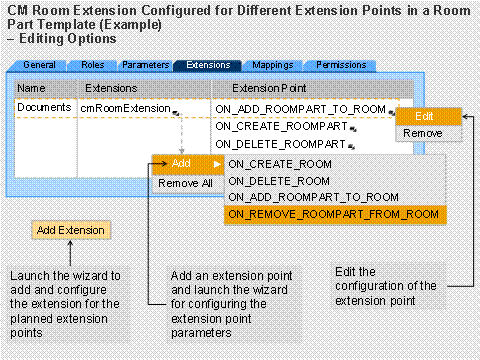
In the room or room part template, the extension is exposed in combination with the list of implemented extension points. Dependent on the use case, the CM Room Extension is configured as follows:
Type of template, in which the extension is configured |
Mandatory extention points |
Room template |
●
|
Room part template |
●
|
The following graphic shows, for example, the CM Room Extension configured in a room part template.
Implementation of an iView
To visualize the folder, there is a SAP standard iView, that can be used.
Configuration of the data flow
The
last step in connecting the backend is to transport the output of the
extension to the iView. This is realized by a parameter mapping: the extension parameter
folderPath is mapped to the iView
parameter startURI.
See also: