
 XML Documents on the Flexible User
Interface
XML Documents on the Flexible User
Interface

This graphic shows the elements of the user interface when XML documents are displayed in a folder:
XML Documents on the Flexible User Interface
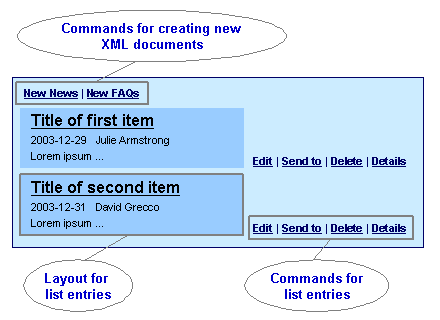
You define settings at the following locations:
Commands for Creating New XML Documents
You use the KM Configuration iView to define which commands are available in which folders (Content-Management à Form-Based Publishing à Forms Availability).

Note that repositories in which you store XML documents must support properties. For example, you can store XML documents in CM repositories, but not in file-system repositories.
For more
information, see
 Form-Based
Publishing.
Form-Based
Publishing.
You can also hide the user interface globally for a project. You may want to do this if you create a project for test purposes. To do this, choose Options ® Project ® Hidden in the XML Forms Builder.
Layout for List Entries
You define the layout for a list entry in the RenderListItem form in the XML Forms Builder.
For more information, see Forms.
If you want to present the contents of an XML document differently in different iViews, also create your own forms in addition to the RenderListItem form. In this case you have to configure a set of XML resource renderer settings when you configure the KM user interface.
For more information, see Custom Forms.
Commands for List Entries
You can configure the commands to be displayed next to each list entry when you configure the KM user interface. You create a command group with the required commands. You reference this command group in the collection renderer settings with the parameter Resource Command Group.
For more
information see
User Interface
Commands.