 Automatic Distribution of Maintenance Certificates
This technical process distributes maintenance certificates automatically via the SAP Solution Manager. You no longer need to get maintenance certificates from the managed system and install them manually in the transaction SLICENSE.
This currently only applies to the ABAP environment.
Prerequisites
Prerequisites:
You have activated the automatic license data distribution for the systems im License Management view in the Change Management work center.
 Note
NoteTo activate the automatic license data distribution for a system:
Choose the system in the System Overview list.
Choose Activate Automatic Distribution under Automatic Distribution.
End of the note.In the managed system:
The software component ST-PI has at least the SAP support package:
SAP Basis 700: ST-PI 2005_1_700 SP06
SAP Basis 710: ST-PI 2005_1_710 SP04
You have activated the Service Data Control Center (SDCCN), and connected it to the SAP Solution Manager. More information: Service Data Control Center.
Function check: SAP EarlyWatch Alerts for the system can be processed in the SAP Solution Manager system.
The system number is known in the managed system (you can display it with the transaction SLICENSE).
In the SAP Solution Manager system:
You have scheduled the background job REFRESH_ADMIN_DATA_FROM_SUPPORT in the transaction SM_CONFIG_JOBS.
Process
Automatic maintenance certificate distribution process:
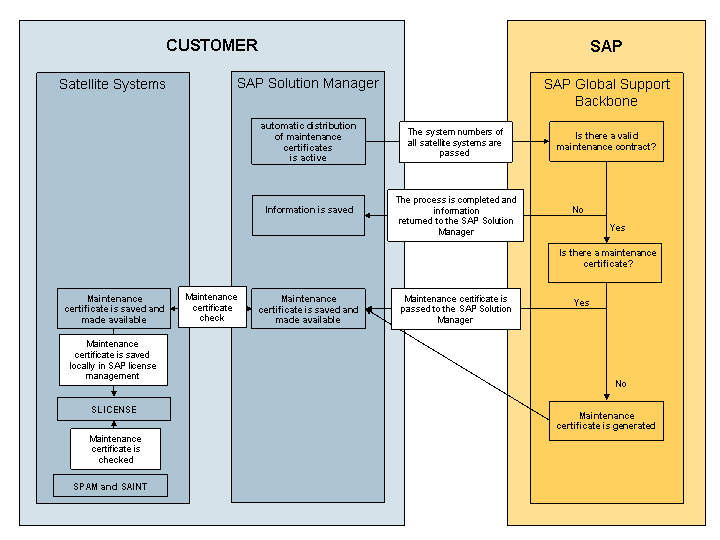
Process overview
The SAP Solution Manager passes the system numbers of the managed systems for which automatic licence data distribution is active, to the SAP Global Support Backbone.
The SAP Global Support Backbone checks each system for a valid maintenance contract.
If there is no valid maintenance contract, the process in the SAP Global Support Backbone ends, and customer SAP Solution Manager is informed.
If there is a valid maintenance contract, the SAP Global Support Backbone checks for a maintenance certificate, and returns it to the SAP Solution Manager.
If there is no maintenance certificate, the SAP Global Support Backbone generates one for this system. The next time it runs (in 24 hours), the SAP Solution Manager can get this maintenance certificate in the SAP Global Support Backbone.
The maintenance certificates are passed to the SAP Solution Manager, where they are saved and made available.
The task Maintenance Package runs daily in the managed systems, in the Service Data Control Center (transaction SDCCN). It gets the maintenance certificate from the SAP Solution Manager by RFC.
If a maintenance certificate has been fetched, it is saved locally in the SAP license management (transaction SLICENSE).
If the installation tools SPAM or SAINT import SAP support packages or SAP support package stacks, the system is checked for a valid maintenance certificate.
Result
If there is a valid maintenance contract, the SAP Solution Manager passes maintenance certificates to the managed systems.
Note
The SAP Solution Manager can apply for a new maintenance certificate from the SAP Global Support Backbone at the earliest 30 days before the maintenance certificates runs out.
Note
IT service providers can get maintenance certificates and licenses for their customers, from the SAP Global Support Backbone. The general IT service provider functionality must be configured.