
 Tutorial: Handling Rooms via the Room
API
Tutorial: Handling Rooms via the Room
API

Overview
The portal includes standard iViews for common tasks, such as room creation and room administration. Existing rooms can be accessed through the Room Directory iView.
In special cases, it might be necessary to create or access rooms from a specific portal application or from a room extension. In such cases, you can use the Collaboration Rooms API.
This document is intended to help developers to become familiar with the Collaboration Room 6.0 API. It helps you to understand the public parts of the Collaboration Room programming environment and to carry out initial steps using the API. It consists of the following parts:
● Architecture of the Collaboration Room 6.0 framework and its integration in the SAP NetWeaver Portal and the Knowledge Management
● Practical information and examples of how to use the Collaboration Rooms API
Architecture
The Collaboration Room 6.0 framework combines different functional aspects of both the portal and the KM platform in one consistent solution. The Rooms API provides an abstraction from this heterogeneous system landscape and therefore offers scenario-oriented access to the functions of the rooms. Three main parts of SAP Enterprise Portal and KM framework are used to store rooms and room-related information:
● PCD
● User management
● Repository framework
The PCD is used to store the portal-related parts of existing room instances such as worksets, pages, and iViews. It is also used as a store for the room templates that make the room creation process much easier for end users.
User management is used to store user-to-room and user-to-room role assignments.
The repository framework is used to create a semantic object for each room. These room objects hold all room information that is not stored in one of the other two layers. This includes the name and description of the room and other basic information.
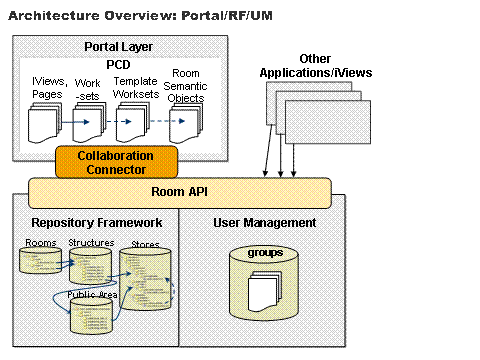
The following steps are performed by the Collaboration Room framework when a new room is created:
...
1.
An
application calls the Rooms API createRoom() method and passes all relevant data for the
new room as a parameter.
2. The Collaboration Room backend system calls the User Management API to:
○ Create a user group containing all users of the new room
○ Create a user group for each room role containing the users assigned to the role in question
3. To ensure compatibility with earlier versions of the Collaboration Room framework, the Repository Framework API is called to:
○ Create a public and a private folder for each selected content store (in the template)
○ Copy content from the content template folders to the new private folders
○ Create a Public Area folder containing links to all new public folders
○ Create a Structure folder containing links to all new private folders and another link to the Public Area folder
○ Set appropriate ACL permissions for all these new folders in the structure
4. The Repository Framework API is called to:
○ Create a new folder resource in a special repository that represents the room itself
○ Set the name, description, and so on for the room as properties of the new room resource
○ Create a link from the room resource to the room Structure folder
○ Set ACL permissions for the room resource
5. The Portal Connector API is called to:
○ Copy the template workset (including pages and iViews) to a special PCD folder
○ Map all room parameters (including the hidden parameters such as room ID) to the iView parameters according to the mapping rules defined in the template
6. The Groupware API is called to send invitation e-mails to all users of the new room.
7. The Status Engine API is called to create a status event for the room creation.
8. At each extension point during the room creation process, the extension framework calls the extensions defined in the template to enable the connection of other backend systems and to add additional functions to the new room.
For more information about the extension framework and how to write new extensions, see Creating Room Extensions.
Rooms API Functions
Here is a list of features provided by the Rooms 6.0 API grouped by function (not complete).
Actions
● Create new rooms
● Check for existence of rooms
● Retrieve existing rooms by ID
● Retrieve rooms for a specified user
● Retrieve rooms with a given privacy
● Retrieve most visited or least visited rooms
● Create or delete typed relations between rooms
● Search for typed relations between rooms
● Delete rooms
● Retrieve room templates
Room-Instance-Based Information Functions
● Room name
● Room description
● Creation date of the room
● Version of the room object
● Date of the last change to the room
● Date when the room was last entered by a specified user
● Date when the room was last entered by any user
● Internal or external room access URL
● Unique ID of the room
● Internal or external room parameters
● Room categories
● Template name
● Template description
● Room privacy
● Lock state
● Hidden status
● Room owner
● Room users
● Room roles
● Members of a given room role
● Room roles of a given user
● Check whether a user is room member
● Check whether a room has public content
● Usage information for the room
● Room events
● Room parts
● Position of room parts in the Detailed Navigation iView
Modifications of a Room Instance
● Room name can be changed
● Room description can be changed
● Room owner can be changed
● Room privacy type can be changed
● Room categories can be changed
● Room parameters can be changed
● Application properties can be set at the room instance
● Hide or unhide room
● Lock or unlock room
● Invite new members to a room
● Remove users from a room
● Change a user’s roles in a room
● Add a user to room roles
● Remove a user from room roles
● Register or deregister a user in a community
● Add or remove room parts
● Change the order of room parts in the Detailed Navigation iView
Rooms API Structure
The technical structure of the Collaboration Rooms 6.0 API is implemented using several Java interfaces. It consists of five main parts (interfaces), which are listed below.
Java Interface for Rooms |
Description |
Rooms API |
The Rooms API is the entry point for other applications to access the functions provided by the Collaboration Room framework. The Rooms API is accessible as a KM service and as a portal service in the portal environment. It does not work on the instance level, but on the factory level, which provides access to specific room instances. |
The RoomObject API provides access to the functions of a specific room instance. For example, an application might use the RoomObject API to invite new users to an existing room. The RoomObject API is implemented directly by RoomObjects. RoomObjects are implemented as semantic objects in the repository framework. |
|
The RoomInfo API is implemented by the RoomInfo object. The RoomInfo object handles parts of the instance data of a RoomObject. It is similar to a partial snapshot of a related RoomObject and can be used to create new rooms. The RoomInfo API therefore provides mandatory field validation and consistency checks for the contained data. The RoomInfo object is also passed to room extensions in order to provide them with information about the room in question. RoomInfo objects do not contain the following information: ● Portal-related information (worksets, pages, and so on) ● Room content (documents, business objects, and so on) |
|
The RoomUsers API provides access to the user-related functions in a room instance, such as changing the user-role assignments. The RoomUsers API is implemented by a RoomUsers object that contains the user-role assignments for a specific room. There are several reasons why the user-related functions have been moved from the RoomObject API to a separate API: ● To keep these rarely-used methods together, but separate from the RoomObject API methods ● Changes to the RoomUsers object do not affect the corresponding room immediately. An application might carry out several changes to the same RoomUsers object (for example, invite new users, cancel the invitation for certain users, and change the roles of other users) and then apply the changes in one step to the room itself. Like in a transactional environment, this prevents the room from having inconsistent or non-final status at certain points in time. The RoomUsers API is coupled with the Status Engine. All changes to the user-role assignments of a room are tracked by the Status Engine using Status Events. The RoomUsers API is also coupled with the e-mail messaging features of the Collaboration framework. For example, when a new user is assigned to a room, an invitation e-mail is sent to the user in question. An instance of the RoomUsers interface is also passed to room extensions at certain extension points in order to provide a set of affected user-role assignments to the extension (for example, added room users or removed room users). |
|
The Room Relations API is implemented by the room relation manager, which can be obtained from the Rooms API. It provides methods for creating or deleting relations between rooms. Each relation has a specific relation type and relates a source room with a target room. The Relations API also provides methods for searching existing relations by: ● Source room ● Source room and relation type ● Target room ● Target room and relation type There is no semantic connection between two related rooms. For instance, there is no role inheritance or content sharing between related rooms. Also, the members of the source room can be completely different from those of the target room. A relation is only a link between one room and another room that makes navigation between the two rooms easier. The Related Rooms iView displays links to all related target rooms and the Related Rooms Admin iView provides a user interface for maintaining these links. |
|
The Room Status Event API provides access to the room-related status events that are automatically logged during system operation. The following functions are provided: · Retrieval of status events related to a certain room · Retrieval of room usage data The status events that are related to a certain room can be retrieved using the RoomObject API (access to the events of the respective room) or the Rooms API (the room has to be specified by its ID). It is possible to filter the events by time stamp, by the status action (defined in RoomStatusAction), and by the user who caused the events. The room usage data can be accessed in two ways: Usage data related to a specific room can be accessed using the RoomObject API and the Rooms API; data regarding the most visited or least visited rooms is accessible using the Rooms API only. |
Prerequisites
Compile Time
To create a new development project using the Rooms API, work through the following steps:
In the Studio, first define a new classpath variable. Go to Window ® Preferences ® Java ® Classpath Variables ® New and add the deployment path of the portal:
|
This path may differ between portal versions; you can find details in the portal documentation.
Now go to File ® New ® Project ® Portal Application to create a new Java project. Open the properties of the project and go to Java Build Path. You will notice that the studio has automatically added some portal libraries. To be able to use the Rooms API in your code and to compile it, you have to include one additional library. To add the library, click New Variable ® PORTAL_HOME ® Extend and take the library listed below:
|
This file can be found on an installed portal (EP 6.0 SP2 Patch 5 or higher) at the following location:
|
Runtime
The runtime environment for the Collaboration Rooms API is a portal installation with version EP 6.0 SP2 Patch 5 or higher. Before deploying your new application code (accessing the Rooms API), you have to add a new Service Reference to your portalapp.xml file:
|
Use Cases for the Rooms 6.0 API
To keep these examples useful and simple, no error handling is carried out in the code. Exceptions are just passed to the calling methods.
For more information about specific method calls or parameters in the method’s signatures, see the Java Documentation for the interfaces.
How to... Get Access to the Rooms KM Service/Portal Service
As mentioned before, the Collaboration Rooms 6.0 API is available as a KM service and as a portal service. To get access to the API, you have to include the correct import statement and instantiate one of the services:
|
- or -
|
How to... Retrieve All Rooms to Which a User Belongs
You can use the rooms service to get a list of rooms to which a specified user belongs.
API method:
IRoom[]
IRooms.getAllRoomsForUser(com.sap.security.api.IUser
user)
Returns all rooms
to which the specified userbelongs.
|
How to… Create a New Room
Creating new collaboration rooms using the Rooms API consists of several steps. In this example, a very simple room is created. Most attributes of the new room are filled with default values from the room template.
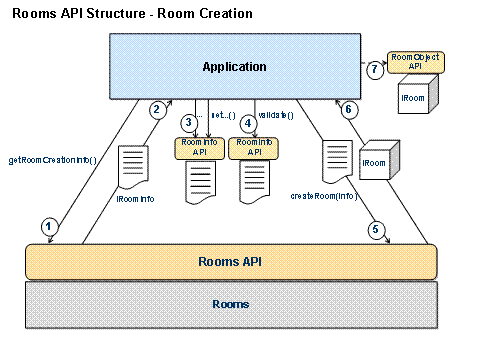
...
1.
The application needs an empty RoomInfo object to
create a new room. This is obtained by calling the Rooms API
getRoomCreationInfo() method.
2.
An
empty RoomInfo object is returned by the Rooms API. This object implements the
IRoomInfo interface but contains no data so
far.
3.
The application calls setName(), setDescription() and other set...() methods directly in this
RoomInfo object instance to set the required data. It is the task of the
application to call more or fewer set...() methods in this step in order to
have control over more or less detail in the new room. Some calls to set...()
methods can be skipped. In this case, default values are taken from the room
template, which has to be set by calling setTemplateName().
4.
When all desired data has been set, the application
calls validate() in the RoomInfo object instance. This method
checks for missing or inconsistent data in the RoomInfo object. If this call
returns true, everything is ok. If it returns
false, a further call to getValidationErrors() provides more information about the
error.
5.
The application calls createRoom() and passes the RoomInfo object as a
parameter to the Rooms API.
6.
If
room creation in the rooms backend system was successful, an instance of
IRoom is returned. This instance represents the new
room. If there were any errors during the room creation process, a
RoomCreationException is returned. The exception contains more
information about the error itself, or the causing exception as a nested
exception.
7.
The application uses the returned instance of
IRoom for further tasks (RoomObject
API).
API methods:
·
ITemplate
IRooms.getRoomTemplate(String templateName)
Returns the
room template named templateName.
·
IRoomRole
ITemplate.getRoomRole(String roleName)
Returns the
room role named roleName from a template instance.
·
IRoomInfo
IRooms.getRoomCreationInfo()
Returns an
empty instance of IRoomInfo, which is needed for room
creation.
·
boolean
IRoomInfo.setName(String newName)
Sets the name
of the new room to newName.
·
boolean
IRoomInfo.addRoomParameter(String paramName, String paramDesc, String
paramValue, boolean isHidden)
Adds a
parameter to the new room. This parameter is mapped like all others to the
iViews of the room according to the mapping rules stored in the template. The
isHidden parameter should normally
be false.
·
boolean
IRoomInfo.setOwnerId(String newOwnerId)
Sets the
owner of the new room. newOwnerId is the unique ID of the user who is to
become the room owner.
·
boolean
IRoomInfo.addUserToRole(String userId, IRoomRole
userRole)
Assigns the
userId user to the userRole room role.
·
boolean
IRoomInfo.validate()
Performs
checks on the RoomInfo object. All required fields need to have a value and
the data must be consistent. The method returns true if everything is okay for room creation. If
it returns false, a call to IRoomInfo.getValidationErrors() provides more information about the
error(s).
·
IRoom
IRooms.createRoom(IRoomInfo info, boolean
sendNotifications)
Creates a new
room using all the values set in the IRoomInfo instance passed as the parameter
information. Before the new room is created, info.validate() is called to make sure that the data is
okay. If sendNotifications is true, e-mail notifications are sent to the new
room users. If the room creation is successful, a new instance of
IRoom is returned to the caller. If errors occur,
a RoomCreationException (nested exception) is returned containing
more information about the error.
|
How to… Change an Existing Room
In this example, an application has the ID of an existing room and wants to invite a new member to the room and change the roles of some of the existing room members.
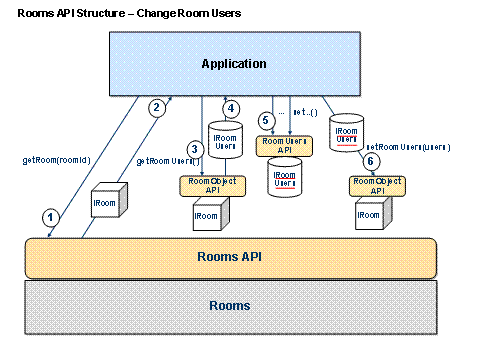
Graphic 1: Change Room Users
...
1.
The application calls the Rooms API
getRoom() method and passes the room ID as a
parameter.
2. If a room with the specified ID exists, the Rooms API returns an instance of that room.
3.
The application calls the Rooms API
getRoomUsers() method directly in the room
instance.
4.
An
instance of IRoomUsers, which holds the current user-room role
assignments, is returned.
5.
The application uses the RoomUsers API to modify
user-room role assignments. For instance, it calls addUserRole() to invite a new user to the room.
6.
When all the changes to the RoomUsers object have
been made, the application calls setRoomUsers() in the room instance and passes the
RoomUsers object as a parameter. This call applies all changes to the room
itself. The second parameter of this call (boolean) tells the Rooms framework whether the
messaging features should be used (for example, if invitation e-mails should
be sent to new users).
API methods:
·
IRoom
IRooms.getRoom(String roomId)
Returns an
instance of the room with the roomId ID.
·
IRoomUsers
IRoom.getRoomUsers()
Returns an
instance of IRoomUserscontaining all user-room role assignments for
the room.
·
IUserRoles
IRoomUsers.addUserRole(String userId, IRoomRole
userRole)
Adds the
userId user to the userRole room role. This assignment is made in the
RoomUsers instance – the room itself is not affected. It returns the
UserRoles object for the specified user, containing contains all room roles
that are assigned to the user in question.
·
String[]
IRoomUsers.getAllUsers()
Returns an array with all the user IDs of the room members.
·
IRoomRole[]
IRoomUsers.getUserRoles(String userId)
Returns an array containing all room roles that are assigned to a specified user.
·
boolean
IRoom.setRoomUsers(IRoomUsers roomUsers, boolean
sendNotifications)
Applies all
changes made in the RoomUsers object, roomUsers, to the room itself. If sendNotifications is set to true, e-mail notifications are sent to affected
users.
|
How to... Create a Room Part
In this version of the API, a new room part can only be created in an existing room. Room part instances cannot be moved to or shared with other rooms, and you cannot create room parts outside of rooms.
This means that you need to get an instance of a room first, and then use the RoomObject API to create a new room part in that room.
In this example, you need not only the rooms service to get a room instance, but also the RoomParts service, which provides access to the RoomPartTemplate service. You can use this service to instantiate a room part template.
API methods:
·
IRoomPartTemplate IRoomPartTemplateService.getRoomPartTemplate(String
roomPartTemplateId) throws
NoSuchRoomPartTemplateException
Returns the
room part template named roomPartTemplateId.
·
IRoomRole[] IRoomPartTemplate.getRoomPartRoles()
Returns all roles defined in this room part template.
·
IRoleMapping RoomPartDataFactory.createRoleMapping(IRoomRole roomRole,
IRoomRole roompartRole);
This method creates a mapping object for mapping a room part role to a room role.
·
IParameterMapping RoomPartDataFactory.createParameterMapping(String
roomPartParameterName, String roomParameterName)
This method creates a mapping object for mapping a room part parameter to a room parameter.
·
IRoomParameterValue TemplateDataFactory.createRoomParameterValue(String
parameterName, String description, String parameterValue,
boolean
hidden)
Creates an
IParameterValue object with the specified properties parameterName, description, parameterValue. The last parameter, hidden, should always be false for room part parameters.
·
IRoomPart createRoomPartInstance(String name, String roomPartTemplate,
IRoleMapping[] roleMappings, IRoomParameterValue[] parameters,
IParameterMapping[] parameterMappings) throws
RoomPartCreationException
This method creates a new instance of IRoomPart with the specified name, based on the specified room part template.
The mappings for room part roles to room roles need to be passed in the parameterMappings array.
The array parameters should contain all external parameters for the room part template with their corresponding values, whereas parameterMappings is used to pass all parameters of the room part template that are mapped to room parameters.
An instance of IRoomPart is returned if the creation is successful. If not, a RoomPartCreationException is returned.
·
intIRoom.setPosition(String
roomPartId, int newPosition)
throwsRoomException
You can use this method of the RoomObject API to change the position of any room part in the Detailed Navigation iView. The newPosition parameter can be set to any value greater or equal to 0. There are predefined values for the top and bottom position: IRoom.DTN_ITEM_POS_TOP and IRoom.DTN_ITEM_POS_BOTTOM. The return value is the new position of the room part after the call.
|
How to Create a Room Relation
You can now use the Room Relations API to create relations between rooms. The API is implemented by the relation manager, which can be obtained by the Rooms API. It provides methods for creating new relations, searching for existing ones, and deleting them.
Each relation is characterized by a source room, a target room, and a relation type. A list of possible relation types is maintained in the configuration of the portal. These relation types can also be accessed using the RelationManager API.
API methods:
·
IRelationManager IRooms.getRelationManager()
This method returns an instance of the relation manager.
·
List IRelationManager.getAllAssociationIds()
The
List returned by this method contains the IDs (in
Strings form) of all relation types configured in
the system. A localized name of the relation type can be obtained by calling
the IRelationManager.getAssociationLabel(String
associationId, Locale locale)method.
·
voidrelateRoom(String sourceRoomId,
String targetRoomId, String associationId) throws
ResourceException
This method
creates a new relation between the sourceRoomId room and the targetRoomId room with the associationId relation type.
·
List getRelatedRoomsFromRoom(String sourceRoomId, String associationId)
throwsResourceException
This method searches for all target rooms of a specified source room with a specified relation type. There is also a signature of this method without associationId, so you can really find all target rooms with all relation types.
It is also
possible to search for all source rooms of a specified target room. This is
done using the IRelationManager.getRelatedRoomsToRoom(String
targetRoomId) and
IRelationManager.getRelatedRoomsToRoom(String
targetRoomId, String associationId)
methods.
·
voidunrelateRoom(String sourceRoomId,
String targetRoomId, String associationId) throws
ResourceException
This method deletes one specific room relation.
It is also
possible to delete all relations where a specific room is source room or
target room in one call: IRelationManager.deleteRoomRelations(String
sourceRoomId).
|
How to Get the Most Used Rooms
This example shows how the Room Status API is used to find the most visited rooms for the last week.
API methods:
· IRoomUsage[] IRooms.getMostVisitedRooms(int listLength, long timeStamp)
Returns an array containing the usage data for the most visited rooms.
|
How to Find Unused Rooms
This is an example of how the Room Status API can be used to find rooms that have not been used for a certain amount of time (for example, to delete or archive them).
API methods:
· IRoomUsage[] IRooms.getLeastVisitedRooms(int listLength, long timeStamp)
Returns an array containing the usage data for the least visited rooms.
|
How to Retrieve All Room User Changes for a Room
This example shows you how to find all status events that are related to room user changes (adding a user to a room, removing a user from a room, and changing the role of a room user) for a certain room.
API methods:
· IRoomStatusEvent[] IRoom.getRoomEvents( long timestamp, RoomStatusAction[] roomActions, String[] userIds, int maxResultSize )
Returns an array containing the retrieved status events.
|