
 Error Handling

Procedure
ALE error handling makes use of the SAP Business Workflow technology in the SAP system. SAP Business Workflow organizes and manages a work process whereby tasks are assigned to individual agents. After completing a task, agents are informed of subsequent work items in their inbox.
SAP Business Workflow is object oriented; ALE error handling objects are IDocs and their methods and events.

If there is an error, only the first message from the return parameter is copied to the text in the associated work item.
Error Handling Process
Example

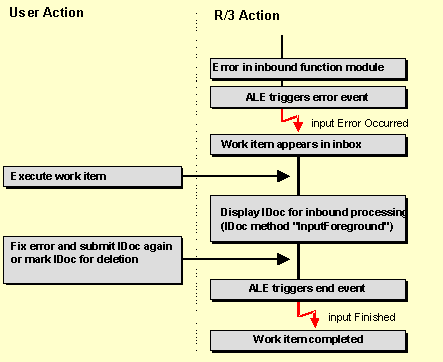
The example below of an inbound error for a material master message shows the steps in ALE error handling:
· The inbound function module passes message to the ALE layer that an error has occurred.
· ALE triggers the object event "inputErrorOccurred" from the IDCOMATMAS category.
· This event is linked to standard task number 00007947, long name "MATMAS_inbound error"
· A work item appears in the user’s inbox, the work item’s short text is the first fifty characters of the error message contained in the IDoc’s status record.
· When the user processes the work item, the IDOCMATMAS method "IDOC.InputForeground" is processed.
IDoc status record is displayed and the user can display the error message's long text. If the user was able to remedy the error, the IDoc can be submitted for updating. If the error cannot be remedied, the user can flag the IDoc for deletion.
· If the IDoc was either successfully submitted or flagged for deletion, IDOCMATMAS’s event "inputFinished" is triggered indicating that the task has been carried out.
Further Information
· Objects, Events and Tasks To Be Created
· Checking Consistency of Inbound Error Handling