 Server Selection and Load Balancing Using the SAP Web Dispatcher
The SAP Web Dispatcher forwards each incoming HTTP(S) request to an appropriate SAP NW Application Server for processing, as illustrated in the following graphic.
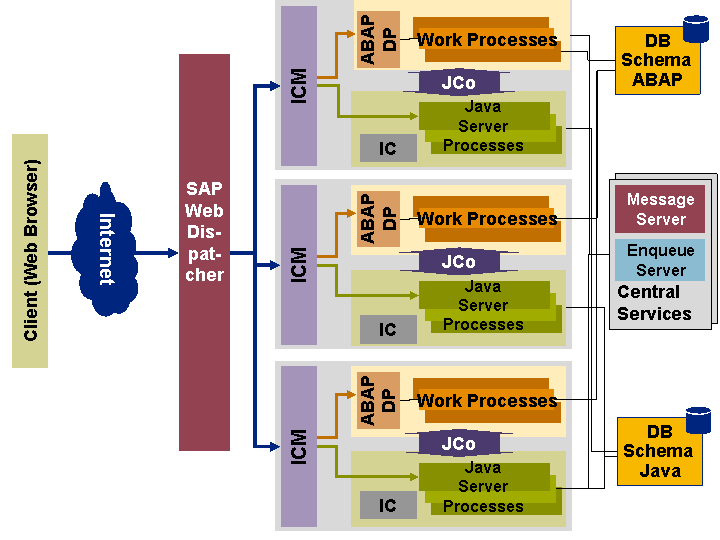
The SAP Web Dispatcher carries out the following tasks:
Checks the session ID to pass subsequent requests for stateful sessions to the processing server (Session-Stickiness).
Decides whether the request is an ABAP request (e.g. a BSP application) or a Java request (for example, a JSP or a servlet).
Load Balancing
HTTPS scheduling or end-to-end SSL
URL filtering
Process
First of all, the SAP Web Dispatcher checks the type of the incoming request (see Processing Administration Requests).
The process flow described below only works if the request is not an administration request.
An HTTP request (or a decrypted HTTPS request) is assigned to a server in two stages. HTTPS requests with End-to-End SSL are dealt with last in this section.
First, the SAP Web Dispatcher decides whether the incoming HTTP request should be forwarded to an ABAP or a Java server. It determines a group of servers in the SAP system that could execute the request. It gets the information about the groups from an application server.
For more information, see:
AS ABAP: Server Groups in ICF
AS Java: Configuring Logon Groups on AS Java
The load is then balanced within this group. When the load balancing process has decided on the server that the request is to be sent to, the SAP Web Dispatcher forwards it to the ICM of this application server.
Determining the Server Group
How the SAP Web Dispatcher determines the server group that will process the request is described under Determining the Server Group.
Working with Logon Groups in the SAP System
If the request is to be sent to an AS ABAP, then you must check whether a logon group (maintained in transaction SMLG) has been defined for this URL. The SAP Web dispatcher checks the list of logon groups to see if one has been defined. If it finds one, the load balancing must be executed within this logon group.
Load Balancing in the Server Group
Both static and dynamic elements are used for load balancing with the SAP Web Dispatcher.
Capacity
Capacity is assigned to every application server. The requests are distributed in turn to the instances depending on their capacity. If server A has twice as much capacity as server B, then A will receive twice as many requests as B.
You can configure the details of the load balancing process in the profile parameter wdisp/load_balancing_strategy. The following load balancing processes are configurable:
Simple Weighted Round Robin
Parameter value: simple_weighted_round_robin
Each server with capacity k receives precisely k requests in succession, before the next server takes over. This process is simple and deterministic since it contains no dynamic elements.
 Note
Note
This process, especially with end-to-end SSL could lead to unexpected results, if many individual servers have to process too many successive requests.
Dynamic Weighted Round Robin
Parameter value: weighted_round_robin (default)
The load is balanced using a load factor. The server with the lowest load factor receives the next request. If a server is assigned a request, the load factor is increased in proportion to the reciprocal value of the server capacity. The load factor is apparent from the Web Administration Interface. As the load factor is constantly changing, the information about the "next preferred server" is simply a snap-shot situation.
This process has the advantage that load balancing on the server is very good, especially with End-to-End SSL.
The process contains another dynamic element: For every application server the Web Dispatcher knows the number of requests that the server still has to process. This information also flows into the server selection.
Server Selection and Load Balancing for HTTPS Requests
Since with End-to-End SSL HTTPS requests the SAP Web Dispatcher is unable to read the URL, it can only distribute HTTPS requests in turn to the HTTPS-enabled servers in the system. This also takes into consideration the capacity of each server. To be able to process J2EE requests, each HTTPS-enabled server must have integrated AS Java. The ICM of the server that receives the HTTPS request can decode the URL and then decide whether the request should go to the ICF or to the integrated AS Java.