
 Phase Structure

Definition
Master data object in SAP Supply Network Collaboration (SAP SNC) that serves as order-neutral basis for creating work orders.
The phase structure describes the sequential phases that the supplier executes when producing a product. A phase represents a specific stage in the production of a product, such as assembly or test. The phase duration is independent of quantity. A process-related, likewise quantity-independent break can follow a phase. The successor phase begins at the end of this break.
In the phase structure for every phase, you can directly assign the input and output components that the phase consumes or provides. Input components are consumed at phase begin, output components are provided at phase end. A work order based on a phase structure can alternatively have the following external components:
● Components from the subcontract order (in addition to the components assigned directly in the phase structure)
● Components from a production process model (PPM) or from a production data structure (PDS) for Supply Network Planning (alternatively the components assigned directly in the phase structure)
However, this is only possible in an SCM server installation.

A process description, which the supplier uses in-house to describe the production process, can be much more detailed than a phase structure. In particular, a phase can consist of multiple work steps (activities). As well, a phase only contains the most important components. The bill of material of the supplier can be much more detailed.
Use
During work order creation, SAP SNC uses the phase structure to determine the following data for the production phases of the work order:
● When at the latest does the supplier have to start each production phase and with which input component quantities, to facilitate on-time delivery?
● When is each production phase completed and when does it provide the required output component quantities?
SAP SNC determines the consumption and availability dates/times of the input and output components by using backward scheduling based on the shipping date/time. In so doing, SAP SNC considers the durations of the phases and breaks from the phase structure, as well as the production calendar at the ship-from location of the supplier.
Structure
Phases
You define the following data in the phase structure for a phase:
● Phase ID and phase description
You can use this data to identify a phase on the Web UI for work orders and in the XML messages for work orders (ID only).
● Sequence number
You assign a number to every phase of the phase structure. In so doing, you determine the sequence in which the supplier has to execute the phases.
● Phase duration
SAP SNC only supports phases with fixed net phase duration, in other words, phases whose duration does not depend on the quantity to be produced.
● Duration of the break following a phase
The break immediately follows a phase. The next phase can begin after the break at the earliest. A break, for example, can be process-related, for example if paint has to dry. The break duration does not depend on the quantity to be produced.
● Phase type
The phase type is a classification characteristic for phases, which you can use to differentiate between an assembly phase and a test phase, for example. You create codes and descriptions for phase types in Customizing for the Work Order.
Components
Every phase of a phase structure must have at least one input component and one output component assigned to it. You have the following options for assigning components to a phase:
● Assign components directly
Here you assign the input and output components directly to the phase in the phase structure.
● Use components from the subcontract order
Here you make settings in the phase structure for the phase so that the phase uses components from the subcontract order. The system copies the components from the subcontract order to the phase when creating a work order.
The phase can use components from the subcontract order in addition to the components assigned directly. However, you can also assign no components directly in the phase structure of a phase. In other words, you can leave the phase empty, and only use components from the subcontract order for the phase. You determine in the phase whether and how the phase uses components from the subcontract order. For more information, see Use of Components from the Subcontract Order.
● Use components from a PPM or PDS
Here you only need an empty phase structure. When creating the work order, the system determines a PPM or PDS and copies the components of the PPM or PDS to the work order. To assign the components to the phases, you need a component assignment rule. You enter this rule in the master data assignment of the work order configuration.
Components Assigned Directly
You can assign the input and output components used or provided by a phase, directly to that phase in the phase structure. The phase structure differentiates between the following types of output component:
● Primary product
The primary product is the product that is ordered by the customer and which is to be produced with the phase structure. You can only define an output product of the phase structure as the primary product. You use the primary product indicator to do this.
● Output component that is processed further as input component in a next phase
In this case, the output component of a phase is needed as input component by the phase that immediately follows. This is required, for example, if one primary product is processed in several sequential phases.
● Output component to be delivered together with primary product
You use this option for an output component of a phase that is to be delivered to the customer together with the primary product without further processing (co-product). Such an output component cannot be the input component of the following phase.
To differentiate between input and output components, you use the input/output indicator in component maintenance.
Component Quantities for Components Assigned Directly
In the phase, you enter the quantity for the input and output components that is required to produce the quantity you specified for the primary product of the phase structure. For example, if you have specified 10 pieces for the primary product, you must base all component quantities on the production of 10 pieces for the primary product.
The phase duration and the break duration do not depend on quantity, so it is irrelevant how much absolute quantity you specify for the primary product. Only the correct quantity ratios matter. Here, all component quantities must correspond to the quantity of the primary product. The following rules result from this:
● If you assign an input or output component directly to a phase, you also have to assign the primary product to this phase or to another phase of the phase structure. This is the only way you can determine the quantity ratio between the component quantity and the primary product quantity.
● If a primary product is processed in several phases, you have to specify the same primary product quantity for all phases.
● If an output component of a phase is processed further in the next phase, the product for this second phase is the input component. The input quantity in the second phase and the output quantity of the first phase must therefore be identical.
Component Quantities for Components from Subcontract Orders
In the phase structure, you can only determine quantities for components assigned directly. If a phase uses components from subcontract orders, the system uses the quantity information from the subcontract order.
General Modeling Principle for Component Assignment
The system monitors the planned data and the actual data in the work order on the level of the phase inputs and outputs (PIOs). The PIOs carry the dates/times and the quantities. In the work order, the beginning of a phase and the end of a phase are only determined indirectly based on the earliest input date/time and the latest output date/time. Every phase must therefore have at least one input component and one output component assigned to it. This is regardless of how you assign the components (directly, from the subcontract order, or from PPM/PDS).
Transportation Phase
The transportation phase is the phase between the shipping of a product at the ship-from location of the supplier and the inbound delivery at the customer location. You do not create it in the phase structure. The system creates the transportation phase automatically during the creation of work orders, using data from the purchase order schedule line.
Parameters
At the phase structure level, you can define parameters for the work order that is created based on the phase structure. In the work order, a parameter and its value provide the supplier with special information that he or she is to consider during the production process. You can define the following parameters in the phase structure:
● The system automatically copies a default parameter to the work order when creating the work order, including the value you specified in the phase structure for the parameter.
● An additional parameter without value is available in the work order in the value help for parameter maintenance.
You can only use parameters that are defined in Customizing for the Work Order under Parameters → Define Parameters.
Example
The following graphic is an example of a phase structure that you are using to produce computers.
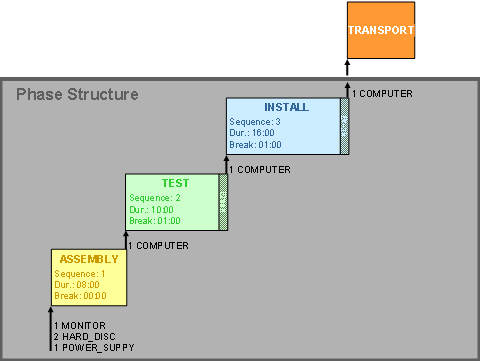
The phase structure contains the following phases:
● ASSEMBLY
● TEST
● INSTALL
The primary product of the phase structure is COMPUTER. The following table shows the input and output components that you have to assign to the phases in the phase structure.
Phase |
Input |
Output |
ASSEMBLY |
1 MONITOR 2 HARD_DISC 1 POWER_SUPPLY |
1 COMPUTER |
TEST |
1 COMPUTER |
1 COMPUTER |
INSTALL |
1 COMPUTER |
1 COMPUTER |
You do not model the transportation phase in the phase structure. The system creates the transportation phase automatically during work order creation.