
 Example: Message Flow for Supplier Managed
Inventory
Example: Message Flow for Supplier Managed
Inventory

This section shows an example of the message flow if a customer uses Supplier Managed Inventory with SAP Supply Network Collaboration (SAP SNC) and an SAP back-end system. SAP delivers standard XSLT mapping for the integration with these back-end variants.

The figures are intended to provide a general overview. SAP recommends using the integration scenarios, which are part of the XI content for SAP SNC. This allows you to generate message flows and routings automatically.
Message Flow: Supplier Managed Inventory
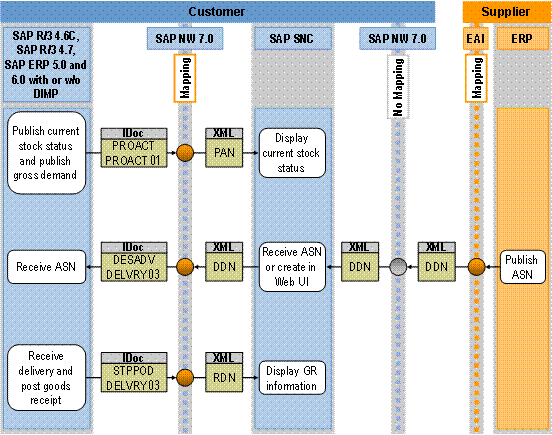
The process runs as follows:
...
1. Publish current stock status and gross demand (customer’s ERP system, SAP R/3 4.6C or higher, with or without DIMP)
The customer publishes the current stock status and the gross demand in his or her ERP system. The ERP system transfers the PROACT.PROACT01 IDoc to the customer’s SAP NetWeaver system. The SAP NetWeaver system converts the IDoc into an XML message of type ProductActivityNotification (PAN), and transfers it to SAP SNC.
2. Display current stock status (SAP SNC)
3. Publish advanced shipping notification (supplier’s ERP system)
When the material is ready for delivery, the supplier can publish an advanced shipping notification in his or her ERP system. The ERP system transfers an XML message of type DespatchedDeliveryNotification (DDN) to the customer’s SAP NetWeaver system, which forwards the message to SAP SNC.

Note that the IDocs, XML messages, and mappings depend on which ERP system and releases are being used. Mappings are sometimes required for the message flow between the supplier’s system and SAP SNC, depending on the supplier’s system. Since the mappings are dependent on the supplier’s system, they cannot be predefined in the SAP SNC standard delivery. You must create the mappings as part of a project solution.
4. Receive advanced shipping notification, or create shipping notification in the Web UI (SAP SNC)
If suppliers do not use an ERP system to send advanced shipping notifications, they can create them in the Web UI. The SAP SNC system transfers an XML message of type DespatchedDeliveryNotification (DDN) to the SAP NetWeaver system, which converts the message into the IDoc DESADV.DELVRY03 and transfers it to the customer’s ERP system.
If you use an ERP system without the DIMP industry extension, you use the mapping DespatchedDeliveryNotification_DesadvDelvry03_01. For SAP ERP 6.0 with DIMP, you use the mapping DespatchedDeliveryNotification_DesadvDelvry03_02.
5. Receive advanced shipping notification (customer’s ERP system)
6. Receive advanced shipping notification and post goods receipt (customer’s ERP system)
When the customer posts the goods receipt, the customer’s ERP system sends the STPPOD.DELVRY03 IDoc to the SAP NetWeaver system. The SAP NetWeaver system converts the IDoc into an XML message of type ReceivedDeliveryNotification (RDN), and transfers it to SAP SNC.
7. Display goods receipt information (SAP SNC)