Activating Classes and
Interfaces
Activating Classes and
Interfaces

Significance of Activation
When you create runtime instances, the system always uses active sources. You should remember this when instantiating classes (CREATE OBJECT statement), since this always refers to the activated class. All components of the corresponding global class that you want to access in the calling program must be activated explicitly.
Components of Global Classes
All global classes have an entry in table TADIR. The corresponding transport object for a class has the name R3TR CLAS <class name> and contains a range of components, each of which is a separate transport unit. Inactive class components are stored in the user’s inactive objects list.
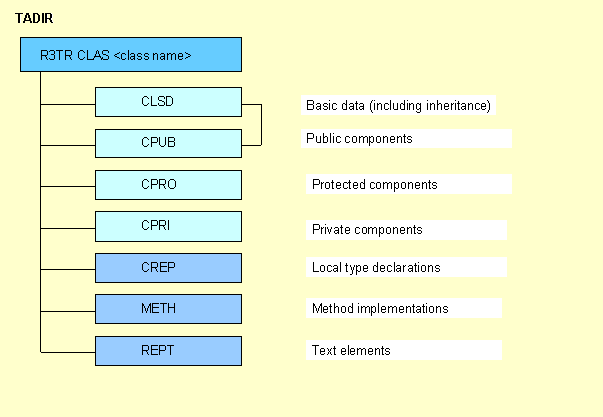
§ The basic data and public components of a class cannot be activated separately.
§ Only the basic data and public, protected, and private sections of a class affect the status display in the Class Editor. If you activate the entire transport object and then change a method implementation, the status remains active.
Components of Global Interfaces
The transport object for an interface has the name R3TR INTF <interface name>. It contains a single object with the name INTF.

When you activate a class that implements an interface, you must ensure that the interface has already been activated. Otherwise, a syntax error will be returned for the public section.
Status Display in the Class Builder
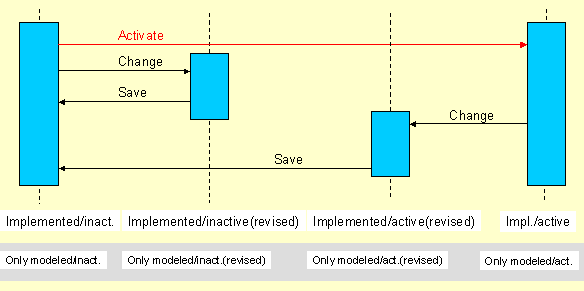
The current status of a class or interface is always displayed in the class editor. It is determined by the:
§ Runtime relevance (Implemented Ö only modeled)
§ Database status (Revised Ö Saved)
Activation (inactiveÖactive)
There are eight possible statuses of classes or interfaces that can appear in the class editor: