 Canceling Documents with Cancellation Documents
 Note
Note
You cannot create a draft cancellation document, nor cancellation documents, using the document generation wizard.
Prerequisites
You have full authorization for canceling documents with cancellation documents.
You are still within the time range allowed for cancellation after posting the document.
The time range is determined by your definition of the
Max. No. of Days for Canceling Marketing Documents Before or After Posting
field in theDocument Settings
window. For more information, see Document Settings: General Tab.
Procedure
Find the particular document you want to cancel.
Right-click in the document window and choose
Cancel,
or choose
Data

Cancel
 . A cancellation document appears with the title
 <Document Type> - Cancellation
.In the cancellation document window, make the necessary data updates.
 Recommendation
Define at least one cancellation series in advance and use a document number of a cancellation series. For more information, see the description of the
Cancellation
checkbox at Series - Document - Setup.End of the recommendation.Choose the
Add
pushbutton.
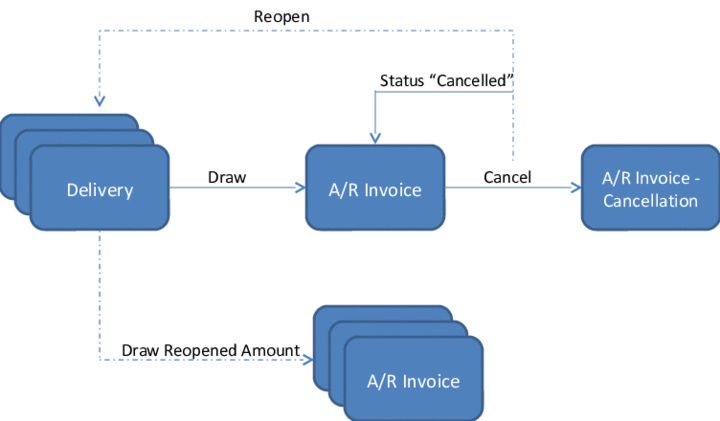
The following figure illustrates the cancellation of an A/R invoice based on deliveries:
Editable Fields when Creating a Cancellation Document
When creating a cancellation document (in Add
mode), you can edit the following data:
Document numbering series, and numbers of the manual series
Posting Date
Due Date
NoteThe due date is automatically updated according to the posting date and payment terms. If there is only one installment, you can edit the
Due Date
field directly. If there is more than one installment, you change the due date by changing the posting date and the installment settings of the payment terms.End of the note.Document Date
Remarks
Attachments
After a cancellation document is added, you can edit as much data as for other closed documents of the same document type.
More Information
Canceling Sales and Purchasing Documents
Cancellation of Documents with Serial Number and Batch-Managed I
Cancellation of Documents with Items Stored in Bin Location
Cancellation of Documents Involving Down Payments
Canceling Documents with Fixed Assets