Show TOC

Background documentationExplicit and Implicit Start Date Determination


Based on the settings for the time reference and time offset in Customizing of the ILM object, you can determine start dates with two different methods:

  • Explicit start date determination

    The rules of an ILM object permit the specification of a related time offset in addition to the specification of the time reference. Start date determination is a two-step process: First, the system determines a specific reference date from the time reference. Then it applies the time offset to the reference date.

  • Implicit start date determination

    The rules of the ILM object permit only specifications for the time reference. In start date determination, a possible time offset can only be applied implicitly by means of a Business Add-In.

The following figure (with explanations) illustrates the different entries and the procedures in explicit and implicit start date determination.
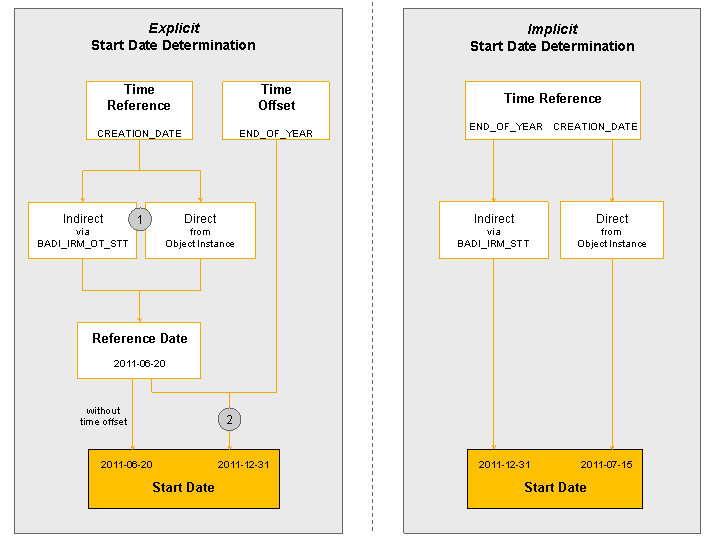
Method

Customizing

Description

Explicit start date determination

At least one available time offset is entered for the available time reference of the ILM object.

This entry causes the ILM rule to be shown in the Time Offset column of the table, and it causes the value help of each time reference to offer the possible time offsets.

In rule evaluation, the system determines the start date based on the rule in the specified time reference and time offset. Start date determination is a two-step process:

  1. Determining the start date based on the rules in the specified time reference

    The following options exist:

    • Direct determination of the reference date

      The system reads the value of the corresponding field in the object instance (according to the setting in object category-specific Customizing).

    • Indirect determination of the reference date

      The standard implementation of the Business Add In BADI_IRM_OT_STT contains the logic for this. The standard implementation supports the source fields of the type Date or Time Stamp. If multiple values were transferred for the source fields, the latest value is returned as the reference date.

      Note Note

      If the logic of the standard implementation does not match the application logic, you can create a BAdI implementation specific to the relevant ILM object. In this case, it is important to specify the filter values of the object category and the ILM object so that the specific implementation is called only for this ILM object.

      If a specific BAdI implementation exists for the ILM object, the system calls it instead of the standard implementation.

      End of the note.
  2. Applying the time offset to the determined start date

    The logic for the application of the time offset can be defined as follows:

    • The standard delivery contains the logic for the following cross-application time offsets:

      • END_OF_MONTH

      • END_OF_QUARTER

      • END_OF_YEAR

    • You can specify the logic for application-specific time offsets in an implementation of the BAdI BADI_IRM_TO.

    Note Note

    If no time offset is entered in the rule, then the determined reference date is used as the start date.

    End of the note.

Implicit start date determination

No available time offset is entered for the available time reference of the ILM object.

The missing entry means that the table of ILM rules for the ILM object does not contain a time offset column. The ILM rules allows only the specification of a time reference.

In rule evaluation, the system determines the start date based only on the time reference specified in the rule. The following options are available:

  • Direct start date determination without time offset

    The system reads the start date from the corresponding field in the object instance (according to the setting in object category-specific Customizing).

    Example: CREATION_DATE (The creation date is considered the start date)

  • Indirect start date determination with implicit time offset

    Business Add-In BADI_IRM_STT contains this logic.

    The time reference refers to an implicit time offset.

    Example: END_OF_FISCAL_YEAR, END_OF_MONTH, END_OF_YEAR