 Working with Subprojects
When you work with subprojects, a task of a project is created as a separate subproject, for example, because a different department or a subcontractor is responsible for the task. To map this relationship, you create an inter-project link between the task of the master project and the project definition of the subproject.
A task of a master project can only ever be linked to a single subproject. The subproject can, however, also be the master project for other subprojects which enables you to map multilevel project hierarchies.
The following figure explains the scenario:
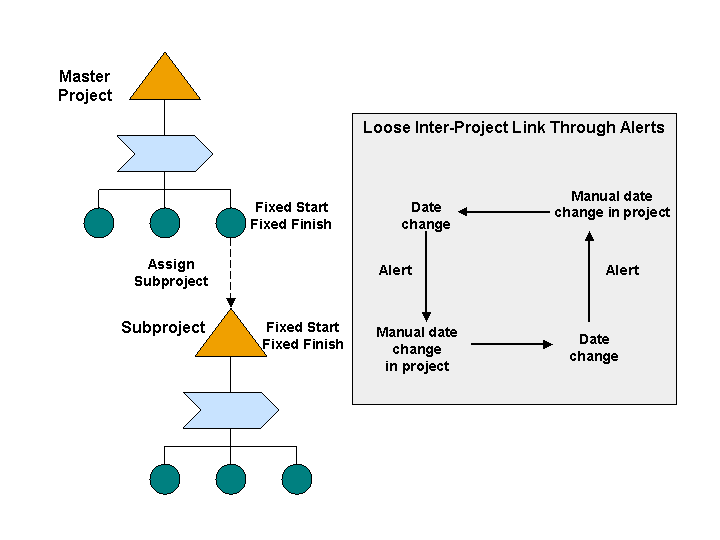
Project Linkage Using Subprojects
Integration
A task that represents a subproject must not contain any subtasks in the master project. Apart from this, it behaves like a normal task that you can process and confirm.
Prerequisites
Your system administrator has permitted the use of subprojects for the current project type (see Customizing for
Project Management
under
Project Management

Structure
Define Project Types
 .
.You have at least
Display
authorization for the subproject.You have entered persons responsible for the task in the master project and for the project definition of the subproject (see Creating Basic Data for a Task or Creating Basic Data for a Project Definition).
If required, you have defined your own mapping of subproject data to master task by implementing the method
TRANSFER_SUBPROJECT_DATA
in Customizing forSAP Portfolio and Project Management
under Project Management
Global Enhancements to Project Elements
Business Add-Ins (BAdIs)
BAdI: Check/Change Fields in Project Management
.Note the prerequisites under Alerts if you want the system to be able to inform the responsible persons about changes.
Features
When you create the inter-project link, the project lead of the subproject receives a message to inform him about the inter-project link. The message contains the dates of the task that belongs to the master project. The project lead can adjust the dates of the subproject manually; there is no automatic adjustment.
Messages are also sent in the following cases:
If a date is changed in the master project or subproject
If the master project or subproject is deleted
If the inter-project link is deleted
In the subproject, an additional area that contains information about the master project appears on the Basic Data
subview of the project definition (see Creating Basic Data for a Project Definition).
In the project structure of the master project, a task that is linked to a subproject is represented by the following icon :  (
(Task for Subproject
). The Basic Data
subview of the task displays the number and severity icon of the assigned subproject as well as the Copy Subproject Data
pushbutton. By pressing this button, you can copy subproject data to the task using the mapping defined in Customizing (see Prerequisites
).
Activities
Create a task that you want to represent a subproject or navigate to a task that already exists.
On the
Basic Data
tab, enter the number of the subproject that the task is to represent.When you save, the system creates the inter-project link and displays the name of the subproject. You can display the subproject data by clicking the name of the subproject. If you have authorization to edit the subproject, you can switch to change mode after you have opened the subproject by choosing
Display/Change
.To delete the inter-project link, delete the entry under
Subproject
.