
 Hierarchical Search Queries
A taxonomy has a hierarchical structure. The categories at the top of the hierarchy contain general information. The deeper you navigate in the taxonomy, the more specific the information becomes.
Pay attention to this hierarchical structure when you define search queries.
Note the following rules:
· The system only classifies a document into a category if it also corresponds to the search queries of all superordinate categories in the path.
This means that a document is only classified into a particular category if it would also fit into the more general superordinate categories.
· If a document corresponds to the search query of a superordinate and subordinate category, the system classifies it into the subordinate category only.
This means that the document is placed into the most specific category possible.
· Categories without search queries are ignored.
This means that if no search query is defined for a category, all documents are passed on to subordinate categories.
Example
You have a taxonomy with the following structure:
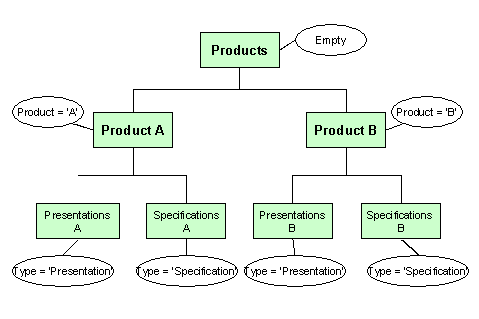
You formulate the search queries using properties that you defined in the configuration of Content Management.
|
Categories |
Search Query |
|
No search query |
|
|
Product A |
Product = A |
|
Product B |
Product = B |
|
Presentations A |
Type = Presentation |
|
Presentations B |
Type = Presentation |
|
Specifications A |
Type = ‘Specification’ |
|
Specifications B |
Type = ‘Specification’ |
Case 1
You evaluate the properties of a document as follows:
Product = A
Type = Presentation
The document matches the search request for the category Product A and for the category Presentations A. It is only placed into the category Presentations A.
It is not placed into Presentations B because it does not match the search query of the superordinate category (Product = B).
Case 2
You evaluate the properties of a document as follows:
Product = A
Type = ‘Concept Paper’
The document only matches the search query for the category Product A. It does not match the search query of a more specific category. It is placed into the category Product A.
Case 3
You evaluate the properties of a document as follows:
Product = C
Type = Presentation
The document is not placed into this taxonomy at all, since it does not match the search query for category A or for category B.