
 Storage Location for Documents
The categories of a taxonomy contain only links to documents, but not the documents themselves. When you upload a document in a category, the system stores the document in a hidden repository (/taxdata). The system then classifies the document in the relevant category.
This is also the case when you create a document online or when you copy or move a document from a KM repository to a category folder.
Storage Location for Documents
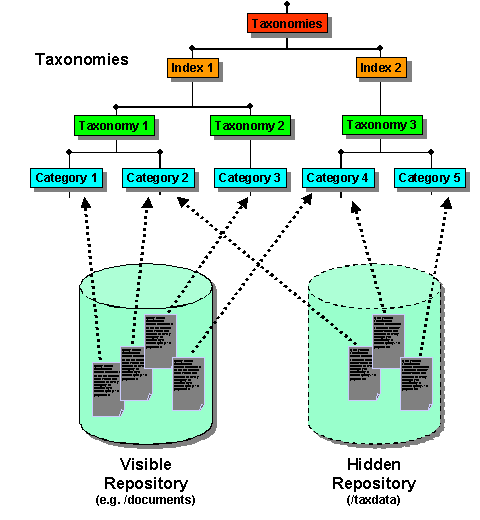
A taxonomy can contain documents from different visible repositories, such as documents, as well as from the hidden taxonomy data repository.
Direct access to the taxonomy data repository is not possible in the portal. The /taxdata/documents folder is used as the storage location for documents that you upload in taxonomies, create online, copy, or move. For example, if you delete an index, the administrator can still access the document.
The system creates a folder /taxdata/documents/<indexname> for each classification index. The system assigns this folder as data source to the index.
The system creates a folder hierarchy that is similar to the structure in the taxonomy below this folder. When you upload a document in a taxonomy folder, the path of the real storage location could be for example:
/taxdata/documents/<indexname>/ <taxonomyname>/<foldername>/documents/document.doc
The folder hierarchy under taxdata/documents is not an exact mapping of the taxonomy structure. It is only used for internal storage of the documents. For example, if you reclassify a document in a taxonomy, this is not reflected in the hidden repository.