
 Layout Controllers
Definition
A layout controller defines the number and position of the screen areas within an iView.
Use
You use layout controllers in the definition of a layout set.
To call up an overview of the available layout controllers in the standard delivery, choose Content Management ® User Interface ® Mapping ® Layout Controllers.
Structure
Layout controllers are based on Java classes. The screen areas used in a layout controller, the assigned flavors , and the positions of the screen areas are defined in the Java classes.
KM-Specific Layout Controller
The standard Knowledge Management delivery contains the following layout controllers, which are used to display iViews that are based on the iView template KM Navigation iView.

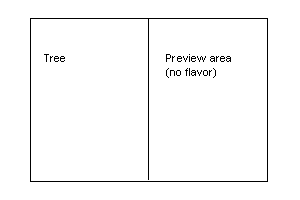
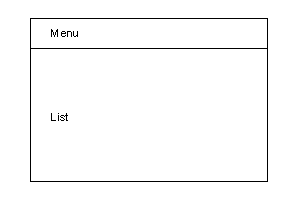
The graphics display the distribution of the screen areas. The names of the assigned flavors are entered into the screen areas.
Layout Controllers with One Screen Area
The following layout controllers use a single screen area with no flavor specification.
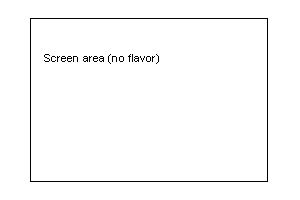
· SimpleLayoutController
· SearchLayoutController
Determines the layout of the search results window
· SelectionModeLayoutController
Determines the layout of the dialog box (see Commands and Command Groups, section Commands with Selection Options in a Dialog Box).
· TabLayoutController
Is used as a container, in which the collection renderer ConsumerTabCollectionRenderer and ConsumerTabContentCollectionRenderer generates a layout similar to a tab page.
Layout Controllers with Two Screen Areas
The following layout controller uses two screen areas with the flavors Grid and List.

· GridListLayoutController
· SelectionModeDoubleLayoutController
In the screen area with the flavor List, a selection list is provided.
The following layout controllers are different to the one mentioned above.
· TreePreviewLayoutController
The left-hand screen area has the flavor tree. The right-hand screen (preview) has no flavor.
· ReportingLayoutController
The upper screen area has the flavor menu; the lower screen area has the flavor list. This layout controller is used to depict reporting functions.
Layout Controllers with Four Screen Areas
The following layout controllers use four screen areas with flavors and are based on the same Java class.
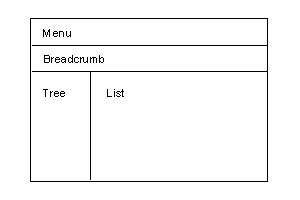
· AdminNavigationLayoutController
· MenuTreeListLayoutController
Layout Controllers with Five Screen Areas
The following layout controllers use five screen areas with flavors and an additional preview window with no flavor. These layout controllers are based on the same Java class.
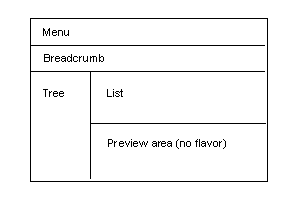
· AdminNavigationPreviewLayoutController
· MenuTreeListPreviewLayoutController
Application-Specific Layout Controller
In addition to KM-specific layout controllers, the standard delivery also contains application-specific layout controllers. Only the applications themselves can use application-specific layout controllers.

Do not use application-specific layout controllers in your own layout sets.
The Collaboration component uses the following layout controllers:
· DiscussionGroupLayoutController
Is used to display the discussion groups.
The upper screen area displays discussion groups. The lower screen area displays the discussions.
· CLPLayoutController
Is used to display a flat list of users and groups on the Collaboration Launch Pad and in the room member list.
· CLPTreeLayoutController
Is used to display a hierarchical list of users and groups on the Collaboration Launch Pad and in the room member list.
· PeopleDetailsLayoutController
Is used to display user details.
· GroupDetailsLayoutController
Is used to display group details.
· RoomDirectoryLayoutController
Is used to display the room directory.
· TaskListLayoutController
Is used to display the task list.
· TreeLayoutController
Displays a tree view, not currently used.
· SessionListLayoutController
Is used to display the session list.
Mapping Layout Controllers
During mapping, you can specify the following parameters:
Parameter |
Required |
Description |
Alias |
Yes |
Alias of the layout controller. This alias is used in the configuration instead of the name of the Java class. |
Description |
No |
Description of the layout controller. |
Java Class |
Yes |
Specifies the Java class that implements the layout controller. |
The alias may not contain spaces. Use a hyphen or an underscore instead.
You can use the class com.sapportals.wcm.rendering.layout.AbstractLayoutComposer, which is provided by SAP, to derive your own layout controllers. You can use these for one-level processes.