
 Comparing Taxonomies
Use
You can use the Compare Taxonomies function to determine the differences between the structures of two taxonomies.
Features
You can compare any two taxonomies in a system with each other, regardless of whether the taxonomies are in the same index.
The system compares the names of the categories and creates a report which shows you the taxonomies nodes that differ. The report contains a list of categories that differ as regards the following points:
· A subcategory has been added
· A subcategory has been removed
· A search query for a category has been changed
· If two categories have different names but identical or similar subordinate trees, the report contains a note that a category has probably been renames.
Activities
To compare two taxonomies, proceed as follows.
You are in index administration.
...
1. Click the name of an index, and then choose Taxonomies.
You reach a list of taxonomies for the index.
2. Select one taxonomy and choose Compare.
The Compare Taxonomies dialog box appears.
3. Choose a second taxonomy from the dialog box:
a. Click Browse…
The folder Taxonomies is displayed in the selection dialog box. You see a list of the classification indexes in your system.
b. Click the name of an index.
You reach a list of taxonomies for the index in question.
c. Select a taxonomy and then click OK.
The path to the taxonomy should have the following structure:
/taxonomies/<index_name>/<taxonomy_name>
4. In the dialog box Compare Taxonomies, select a folder in which the report is to be stored (for example, /~system).
5. Choose Compare.
The following links appear on the screen:
¡ Report Folder: Link to the folder that the system creates the report in once the comparison has been completed.
¡ Report: Link to the report that the system creates once the comparison has been completed.

The duration of the comparison depends on the size of the taxonomy.
Example
Comparison of Two Taxonomies
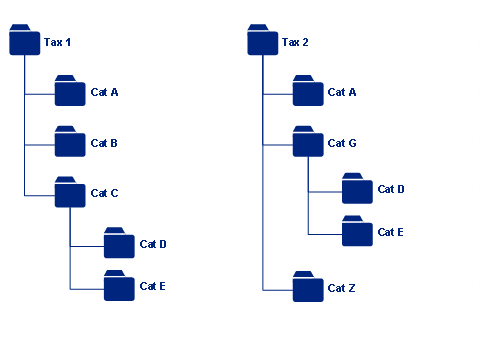
How to Interpret the Report:
Report Output |
Description |
root: Tax 2
Missing Categories /Cat B /Cat C
|
Taxonomy 1 contains two categories that do not occur in taxonomy 2. |
Added Categories: /Cat G /Cat Z
|
Taxonomy 2 contains two new categories that do not occur in taxonomy 1. |
Probably Renamed Categories /Cat C -> /Cat G
|
The system has determined that categories C and G have an identical substructure. The system therefore includes in the report a note that the category has probably been renamed.
|
Category: A Query differs
|
If two categories have the same name in the two taxonomies, but have two different search queries, the system writes a message in the report. You can display and edit search queries in the Taxonomy Query Builder.
|