 Transaction Post Workflows
A Transaction Post Workflow (TPW) is the mechanism TEF provides for processing records of completed transactions. In the SAP Enterprise POS application, for example, a Transaction Post Workflow is used to:
Record the transaction details into the
TLog
Record totals used for reporting purposes in separate database tables
Convert the transaction details to IXRetail format
Publish it to external consumers
Transaction records typically originate from the business logic of a TEF application (at the time a transaction closes), but they may also be sent from an external application, such as in the case of importing layaway information from a SAP POS system to a SAP Enterprise POS system.
The following diagram illustrates the typical process of transaction posting in a distributed environment.

Transaction Posting in Distributed Environment
In the typical process:
A cashier rings a transaction at a POS terminal in the store. This transaction is processed by the POS Application on the store server.
At the end of the transaction, the POS Application passes the transaction details to the Transaction Director running on the same server.
Based on configuration settings read from the TPW configuration file, the Transaction Director sends a transaction posting message to the Async Services Application on both the store and HO servers.
When the Async Services Application receives the posting message, it again calls the Transaction Director, passing in the transaction details.
Again, based on configuration settings, the Transaction Director (on both the store and HO servers) calls the appropriate TPW Step instances to process the transaction. These TPW Steps may update database records (such as
TLog
and totals tables).At the HO, a TPW Step also converts the transaction information to a standard format (IXRetail) and sends out a message containing this representation of the transaction for external systems to consume.
Creating a TPW Step
Transaction Post Workflow steps must implement the ITransactionPostStep
interface. The interface definition is shown below:
 Syntax
	/**
	 * Interface to be implemented by all Transaction Post Workflow Steps. A Transaction
	 * Post Workflow Step is an intermediate operation within the transaction posting
	 * process. The Transaction Posting process normally involves multiple steps and
	 * the steps are performed in a specific order.
	 */
	public interface ITransactionPostStep {
		/**
		 * Executes a transaction workflow post step.
		 *
		 * @param aPropertyMap a property map that contains transaction data. The
		 *   contents of this map should generally not be modified.
		 *
		 * @return a PostingNotificationCollection containing posting notification
		 *   collected from all transaction data consumers involved in the step.
		 *
		 * @throws TransactionDirectorException If an error occurs during posting.
		 */
		public PostingNotificationCollection execute(IPropertyMap aPropertyMap)
          throws TransactionDirectorException;
	}
Inputs
IPropertyMap aPropertyMap
The details of the transaction to be posted are provided to the TPW step as an instance of IPropertyMap
. In this case, the IPropertyMap
has the basic structure shown below.
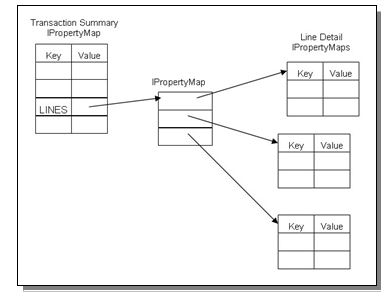
IPropertyMap Basic Structure
The top level
IPropertyMap
passed into the execute method consists of “transaction summary” information (such as the total amount of the sale or the transaction number).This top level
IPropertyMap
contains a property with the keyLINES
.The value associated with the key
LINES
is anIPropertyMap
array. Each element of the array points to anotherIPropertyMap
instance.Each of these
IPropertyMaps
, in turn, contains the attributes for a single line in the transaction.The list of property identifiers (the keys) are described in the JavaDocs for class
TLogProperty
(and, in some cases,TLogPropertyName
). For more information, see SAP Enterprise POS JavaDocs.Each such property may apply to different aspects of the transaction. That is, a property may provide summary information or it may provide details of a particular line. A given property may apply to only a specific type of line or it may apply to multiple line types. The properties that apply to the various transaction and line types are described in TLogProperty Association Tables.
Outputs
The execute method returns an instance of PostingNotificationCollection
. This return value is currently reserved for future use. A “null” return is not allowed, however, so your implementation should always construct and return an instance of PostingNotificationCollection
.
Other Considerations
It is important to note (as stated in the above interface definition) that the IPropertyMap
passed in to the execute method should generally not be modified without careful consideration. That is, you should not remove or modify any of the existing properties
in that map. Remember that this IPropertyMap
is a representation of transaction details and any changes to the information (especially the financial information) that it contains could damage the integrity of the transaction and produce subsequent accounting errors in the
system.
Configuring TE with the New Step
Transaction Posting is configured via an xml document file conforming to the schema defined in NewTransactionWorkflowDef.xsd
. This configuration file controls the sequence of processing steps performed on a per-application basis, as well as where (on which server
or servers) and how (synchronously or asynchronously) the processing steps run. For more information, see Transaction Post Workflow Configuration File Schema.
 Recommendation
We recommend that you validate your modified configuration file against the schema NewTransactionWorkflowDef.xsd
located under <te>/deployment/common/tpw
where <te>
is the directory in which you
unpacked the SAP Enterprise POS distribution file.
Once you have written your TPW class, you need to add it to the appropriate configuration file(s). An example of a typical change is shown below.
 Note
Note
In the xml code samples in this section, some elements have been removed for clarity and some lines have been wrapped to fit the page.
Syntax
Store Configuration File (CentralPM_HOFailover_StoreServer.xml
)
In this example, the configuration files are for a deployment where POS Manager is running at the Head Office (HO) and the HO server supports POS terminal fail over. In this case, there is a new TPW step for the POS application that must run at both the stores and the HO. The implementation
class for the new step is called com.mystep.ExtraPOSProcessing
.
The changes to the configuration files required to incorporate this step into the processing stream are the lines between the characters  and
and  .
.
	<?xml version="1.0" encoding="UTF-8"?>
	<transactionWorkflow xmlns:xsi=http://www.w3.org/2001/XMLSchemainstance
		xsi:noNamespaceSchemaLocation="NewTransactionWorkflowDef.xsd" version="1.0">
		<!-- ImmediateSteps are executed in the order that they are listed -->
		<transactionPost applicationType="POS">
			<postNotification>
				<!-- Process in background on this store server -->
				<destinationNode>SITE</destinationNode>
				<messageName>LocalPOSBackgroundTPW</messageName>
			</postNotification>
			<postNotification>
				<!-- Send to HO server -->
				<destinationNode>HOST</destinationNode>
				<messageName>FromPOSStoreServerTPW</messageName>
			</postNotification>
		</transactionPost>

		<transactionPost applicationType="EFTMANAGER"/>

		<transactionPost applicationType="CONFIGURATOR"/>

		<notifiedOfPost messageName="LocalPOSBackgroundTPW">
			<immediateStep>
				<className>com.triversity.transactionware.transactiondirector.
								SiteTlogPostWorkflowStep</className>
			</immediateStep>
			<immediateStep>
				<className>com.triversity.transactionware.transactiondirector.
								IxRetailExportTlogPostWorkflowStep</className>
			</immediateStep>
			<immediateStep >
				<className>com.triversity.transactionware.transactiondirector.
								OLCPostWorkflowStep</className>
			</immediateStep>
			►►<immediateStep >
				<className>com.mystep.ExtraPOSProcessing</className>
			</immediateStep>◄◄
		</notifiedOfPost>

		<notifiedOfPost messageName="ImportedTlogTPW">
			<immediateStep>
				<className>com.triversity.transactionware.transactiondirector.
								SiteTlogPostWorkflowStep</className>
			</immediateStep>
		</notifiedOfPost>
	</transactionWorkflow>
Syntax
HO Configuration File (CentralPM_HOFailover_HOServer.xml
)
In this case, the new TPW step must be added to the HO configuration twice. Once for the workflow that is executed for a POS transaction that is posted to the HO from a store server, and once for the workflow that is executed for a POS terminal that has failed over and is connected directly to the HO.
The changes to the configuration files required to incorporate this step into the processing stream are the lines between the characters and
.
	<?xml version="1.0" encoding="UTF-8"?>
	<transactionWorkflow xmlns:xsi="http://www.w3.org/2001/XMLSchemainstance" xsi:noNamespaceSchemaLocation="NewTransactionWorkflowDef.xsd" version="1.0">
		<!-- ImmediateSteps are executed in the order that they are listed -->
		<transactionPost applicationType="POS">
			<postNotification>
				<!-- Process in background on this store server -->
				<!-- This gets executed when the POS runs in failover mode -->
				<destinationNode>SITE</destinationNode>
				<messageName>LocalPOSBackgroundTPW</messageName>
			</postNotification>
		</transactionPost>

		<transactionPost applicationType="POSMANAGER">
			<immediateStep >
				<className>com.triversity.transactionware.transactiondirector.
								PrepareRepositoryStep</className>
			</immediateStep>
			<immediateStep>
				<className>com.triversity.transactionware.transactiondirector.
								SACRecordTrxPostedStep</className>
			</immediateStep>
			<immediateStep>
				<className>com.triversity.transactionware.transactiondirector.
								SiteTlogPostWorkflowStep</className>
			</immediateStep>
			<immediateStep>
				<className>com.triversity.transactionware.transactiondirector.
								AccountingTlogPostWorkflowStep</className>
			</immediateStep>
			<immediateStep>
				<className>com.triversity.transactionware.transactiondirector.
								TotalsTlogPostWorkflowStep</className>
			</immediateStep>
			<immediateStep>
				<className>com.triversity.transactionware.transactiondirector.
								IxRetailExportTlogPostWorkflowStep</className>
			</immediateStep>
		</transactionPost>

		<transactionPost applicationType="EFTMANAGER"/>

		<transactionPost applicationType="CONFIGURATOR"/>

		<notifiedOfPost messageName="LocalPOSBackgroundTPW">
			<immediateStep >
				<className>com.triversity.transactionware.transactiondirector.
								PrepareRepositoryStep</className>
			</immediateStep>
			<immediateStep>
				<className>com.triversity.transactionware.transactiondirector.
								SACRecordTrxPostedStep</className>
			</immediateStep>
			<immediateStep>
				<className>com.triversity.transactionware.transactiondirector.
								SiteTlogPostWorkflowStep</className>
			</immediateStep>
			<immediateStep>
				<className>com.triversity.transactionware.transactiondirector.
								BindTillStep</className>
			</immediateStep>
			<immediateStep>
				<className>com.triversity.transactionware.transactiondirector.
								AccountingTlogPostWorkflowStep</className>
			</immediateStep>
			<immediateStep>
				<className>com.triversity.transactionware.transactiondirector.
								TotalsTlogPostWorkflowStep</className>
			</immediateStep>
			<immediateStep>
				<className>com.triversity.transactionware.transactiondirector.
								IxRetailExportTlogPostWorkflowStep</className>
			</immediateStep>
			►►<immediateStep >
				<className>com.mystep.ExtraPOSProcessing</className>
			</immediateStep>◄◄
		</notifiedOfPost>

		<notifiedOfPost messageName="FromPOSStoreServerTPW">
			<immediateStep >
				<className>com.triversity.transactionware.transactiondirector.
								PrepareRepositoryStep</className>
			</immediateStep>
			<immediateStep>
				<className>com.triversity.transactionware.transactiondirector.
								SACRecordTrxPostedStep</className>
			</immediateStep>
			<immediateStep>
				<className>com.triversity.transactionware.transactiondirector.
								SiteTlogPostWorkflowStep</className>
			</immediateStep>
			<immediateStep>
				<className>com.triversity.transactionware.transactiondirector.
								StoreStateTlogPostWorkflowStep</className>
			</immediateStep>
			<immediateStep>
				<className>com.triversity.transactionware.transactiondirector.
								BindTillStep</className>
			</immediateStep>
			<immediateStep>
				<className>com.triversity.transactionware.transactiondirector.
								AccountingTlogPostWorkflowStep</className>
			</immediateStep>
			<immediateStep>
				<className>com.triversity.transactionware.transactiondirector.
								TotalsTlogPostWorkflowStep</className>
			</immediateStep>
			<immediateStep>
				<className>com.triversity.transactionware.transactiondirector.
								IxRetailExportTlogPostWorkflowStep</className>
			</immediateStep>
			►►<immediateStep >
				<className>com.mystep.ExtraPOSProcessing</className>
			</immediateStep>◄◄
		</notifiedOfPost>

		<notifiedOfPost messageName="ImportedTlogTPW">
			<immediateStep>
				<className>com.triversity.transactionware.transactiondirector.
								SiteTlogPostWorkflowStep</className>
			</immediateStep>
		</notifiedOfPost>
	</transactionWorkflow>
 Caution
We recommend that you do not add immediate steps directly to the TransactionPost
element of the POS application but, rather, use the NotifiedOfPost
element as shown in the above example. Extended processing or any error in a step
performed synchronously (as is the case with TransactionPost
element) may result in a slowdown of transaction throughput at the POS terminal.
Locating the TPW Configuration Files
The configuration file(s) to be modified can be found under <custom>/ear/framework/tpw/<topology>
where:
<custom>
is the location of the TE custom directory on the target system (the system where SAP Enterprise POS is to be deployed). The location of this directory depends on where you have “cloned” the custom directory from the distribution. For information on the custom directory cloning process, see the SAP Enterprise POS Installation Guide by accessing http://help.sap.com

SAP for Industries

SAP for Retail
Installation and Upgrade Guides
SAP Enterprise POS / SAP Enterprise POS
 .
.<topology>
depends on your intended deployment topology and node types and is one of the following:CentralPOSM_NoHOFailover
for POS Manager running at the Head Office (HO) and with no support for POS terminal fail over to the HO server.CentralPOSM-HOFailover
for POS Manager running at the HO, with support for POS terminals to fail over to the HO server.collapsed
for a single node deployment, with all applications running on a single system.HOFailover
for nodes that will act only as a fail over target for POS terminals (no POS Manager or Configurator).OLC
for an “offline capable” client system.StorePOSM
for cases where POS Manager will be running at the store.
Under the appropriate subdirectory, you will find either one or more XML configuration files. In cases where there is more than one file, the store and HO files can be determined based on the file name. HO configuration file names include the string HOServer
whereas
store file names include StoreServer
.
Packaging and Deploying the New Step
Once you have modified the appropriate configuration file(s), you will need to replace the existing files in the SAP Enterprise POS distribution file with your custom versions. You will also need to add your new TPW step classes to the deployable .ear
file.
For further information, refer to the section Packaging and Deploying a Customized Version of SAP Enterprise POS in the SAP Enterprise POS Installation Guide.