 Displaying the Process in a Graphical Representation
The process visualization shows the process as a diagram. You can launch the process visualization from a process context (process list) and from a task context (task execution user interface). For more information refer to Displaying Processes in the Process List, Task Execution User Interface.
The process depiction in the process visualization is similar to the visualization scheme in the process composer, which follows the Business Process Modeling Notation (BPMN).
Procedure
You can open the graphical representation of a process in the following ways:
In the process list, select the process which you want to display in a diagram and click Process Flow.
In the task execution user interface (task execution UI), click the process name link at the top right.
The process visualization is opened in a separate window.
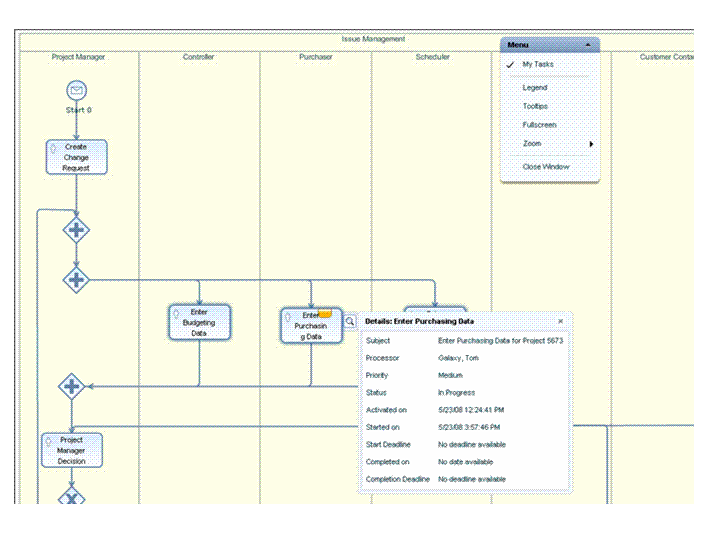
The process visualization shows the process flow illustrated according to BPMN. You can display a legend, which describes the graphical elements. In the Menu, choose Legend. For more information about BPMN refer to http://www.bpmn.org/.
You can display all the tasks in which you are involved as well as details of these tasks.
In the Menu, select My Tasks.
This is selected by default.
To display details of a task click
 (Choose Object's Details) at the task
element.
(Choose Object's Details) at the task
element.