 Technical System Landscape at Design Time
Technical System Landscape at Design Time
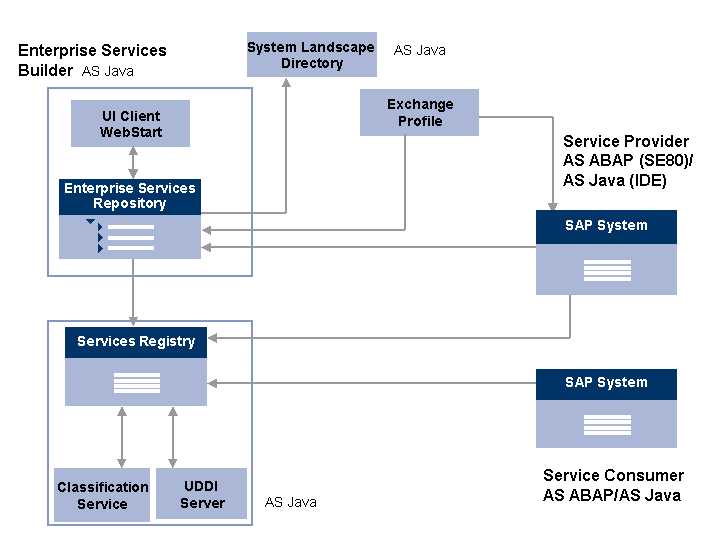
The following components are involved in technical communication:
The technical system landscape is mapped in the System Landscape Directory (SLD).
The SLD is based on the Application Server (AS). From which SLD are software component versions loaded on the Enterprise Services Repository.
More information: System Landscape Directory Security Guide
The exchange profile contains configuration information about the technical system landscape.
For more information about the exchange profile, see SAP NetWeaver Process Integration Security Guide under: Technical System Landscape
In the Enterprise Services Repository the Enterprise Services Builder provides objects for modeling services. User access to these objects can be made using the UI Client.
The Enterprise Services Repository is based on AS Java. Service interfaces from the Enterprise Services Repository can be published in the Services Registry.
The service provider is an AS ABAP or an AS Java.
You generate proxies in transaction SE80 in AS ABAP, and in the IDE in AS Java.
The Web service and Web service client configuration is provided in the local SAP NetWeaver Administrator. SAP NetWeaver Administrator is based on AS Java.
You can also configure ABAP Web services in transaction SOAMANAGER.
Web services are published in the Services Registry.
Service interfaces from the Enterprise Services Repository can be published in the Services Registry.
From the Application Server you can publish server proxies and clients in the Services Registry.
From Application Server ABAP you can publish service definitions and service endpoints in the Services Registry.
The basis of the Services Registry is the classification service and a UDDI server v3.0. Each AS Java has a local Services Registry. Configure one of these registries as the central registry in your system landscape.
The service consumer, an AS ABAP or Java, searches for and finds the service definition in the Services Registry.
The service consumer generates and implements the consumer proxy in AS ABAP or AS Java.
For more information about the technical system landscape, see the resources listed in the table below.
Topic |
Guide/Tool |
Quick Link to the SAP Service Marketplace |
Technical description of Web services and the underlying components such as SAP NetWeaver |
Master Guide |
service.sap.com/instguides |
Security |
Service.sap.com/security |