 AbstractButtonChoice Properties
repeatSelectedAction
Repeats the selected action.
A small tick mark is displayed in front of the menu icon for the visualization of repeatSelectedAction=true.
 Example
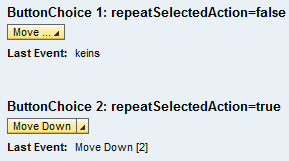 (Visualization for repeatSelectedAction = true and repeatSelectedAction = false)End of the example.
selectedActionItem
Selected action.
This property, which does not have to be bound, can be changed by the client.
More information: Properties Used in MultiPane or TablePopin