 SAP List Viewer in Web Dynpro ABAP
SAP List Viewer (ALV) is a flexible tool used to display lists and tabular structures. It provides common list operations as standard functions and can be enhanced by user-specific functions.
The SAP List Viewer is already available to you as a Web Dynpro component that you can integrate into your application.
The ALV component SALV_WD_TABLE is a configurable Web Dynpro component used to display data in the form of tables. It contains a configuration model (ALV configuration model), which you can use to determine the appearance, functions, and runtime behavior of the ALV display, as well as the display of the standard ALV display.
For the end user, the standard output consists of a toolbar, a title, and the output table.
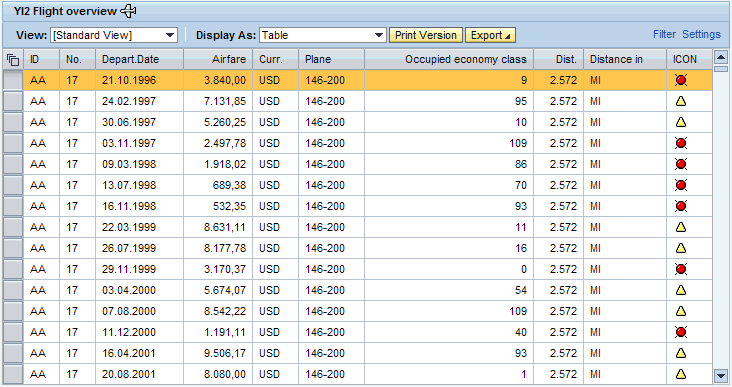
Features
Personalization for User
A variety of personalization options are available to the user and these can be saved in personalized views.
For example, the following functions are available depending on the ALV configuration:
Filters
Sorting across multiple columns
Displaying calculations and subtotals
Display in Crystal Reports with predefined Crystal Report layouts
Configurable print version in PDF format
Export of data to Excel
Hierarchical display of table
In addition to these personalization function, the user is also provided with the Web Dynpro personalization. For more information, see: Personalization
Functions for Application Developers
As application developer you can include the ALV in your Web Dynpro application and can either use it with the specified presettings or also use the ALV Configuration Model. With the ALV Confiuration Model you can decided which of the stndard functions are available to the user and how these are intially configured. You can find a detailed overview of this here: Standard Functions of the ALV and Presettings
You also have a variety of options with the ALV Configuration, for example you can:
Design the appearance and behavior of the ALV display. Amongst other things you can use diferent cell editors and define background colors and size settings
Implement drag and drop
Allow user to enter and change data and configure it
Design special areas above and below the table. These can be exported in different file formats for printing or table calculations.
Provide the user with application-specific functions using UI elements in the toolbar
Procedure
Integrate the ALV into your application
You must execute the following procedures to be able to use the ALV with its standard settings and functions in your Web Dynpro application.
In your Web Dynpro component you define a use for ALV Component (SALV_WD_TABLE).
For more information: Defining ALV Component Usage
You map the data of your Web Dynpro component with the context node DATA of the ALV Component.
For more information: Providing Data for ALV Display
A TABLE view is contained in the ALV Component which you can include in your application where you want to display the table.
More information: Using ALV Views
Configuring Dynamically with ALV Configuration Model
If you want to changes the standard settings or implement further functions then you also have to include the ALV Configuration Model along with the procedure just described.
You get the ALV Configuration Model in a method in the Component Controller.
For more information: Getting the ALV Configuration Model
The following sections contain the different procedures for designing the ALV:
More Information
Objects of the ALV Configuration Model
List Display with Crystal Reports
 Note
Note
You can find the basic sample component WDT_ALV in your system in package SWDP_DEMO, subpackage SWDP_DEMO_TUTORIALS.