Creating a New Enterprise Application
In this step you create a new enterprise application. Later you will use this application to export a deployable EAR file.
Procedure
From the menu path, choose
 File
File  New Other
  .
.In the dialog that appears, select
J2EE Enterprise Application Project .MyLoginModuleEAR Specify as name of the project.
Choose Next. Do not change the default settings.
Choose Next.
Select MyLoginModuleProject to add it to the EAR project.
Choose Finish.
Result
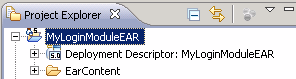
Under Java EE perspective the system displays the following result:
Result Preview