 Delta Handling in Customizing and Personalization
The process of adapting a Web Dynpro application to suit the needs of individual users is generally divided into different steps.
 Example
An administrator configures the settings for a defined group of users (customizing)
An individual user then adjusts some settings of the application to suit his or her own specific needs (personalization)
When the application configuration is saved at the end of this process, certain information is lost – for example, you can no longer see which changes were made by the administrator and which by the user. Therefore, it is generally necessary to store customizing and personalization data in a way that allows the merged data to be managed appropriately. This gives rise to the following requirements:
Changes in the customizing of an application must be visible to the user for all contained pages, unless the user has overwritten the specific property with his or her own value.
Administrators must be able to flag the value of a property as final. This must then be valid for all users involved, even if the property was already changed by a single user and saved as a personalization. Once an administrator has flagged a property as final, any changes to the value in the form of the personalization of a single user must no longer be permitted.
Users and administrators must be able to reverse a change.
To enable administrators and end users to use customizing and personalization appropriately, this must be taken into account when developing the relevant components.
Primary Attribute
If you have created a custom controller and flagged it as a configuration controller, you can add the following specific information in its context:
In every node of this context, you can flag exactly one attribute as the primary attribute of the node. At runtime, this attribute is used as the key for assembling the configuration data. The concept of the primary attribute corresponds to that of the key field in a database table. In the following example, the ID attribute was marked as the primary attribute.

After customizing, the framework recognizes a new value for the element with the ID 2MB, even though it has different index in the element set of the customizing data than in the set of the configuration data. The result of the overlay then contains all unchanged, configured values as well as all values overwritten or added in customizing.
The two separate element sets are known to the framework and can thus be read at any time. Therefore, if the customizing of the element with the ID 2MB is deleted, the value from the set of configuration data is used automatically.
The primary attribute is defined by the developer of the component at design time.
For the above example, the adjustment process is then as follows:
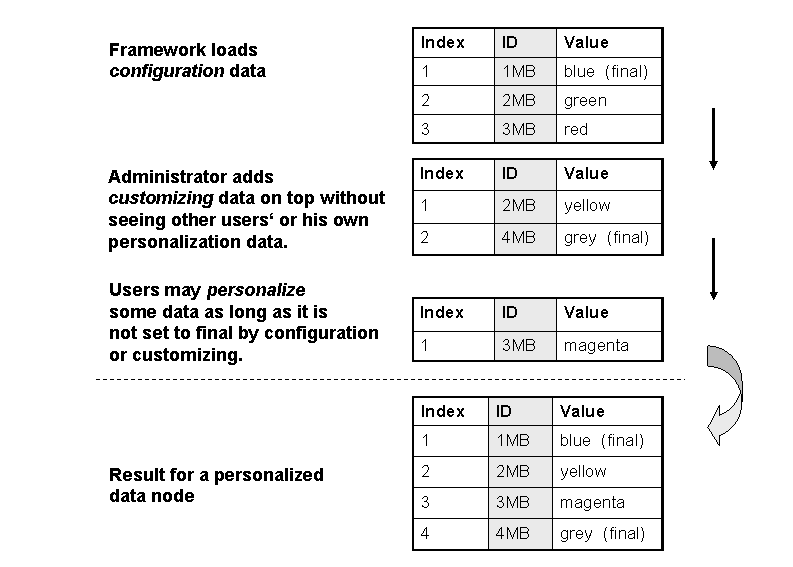
Individual elements can be flagged as final both in the configuration and in customizing. However, these can longer be changed in a subsequent adjustment step.