SAP NetWeaver BI Accelerator (BIA)

SAP NetWeaver BI Accelerator: a Key Functionality for High-Performance Analytics
The BI accelerator is based on TREX technology. It is the aggregation engine for the accelerator functionality of SAP NetWeaver Business Intelligence (BI), a key functionality for high-performance analytics, which belongs to the Enterprise Data Warehousing IT scenario.
For more information see the SAP Net Weaver Master Guide on SAP Service Marketplace service.sap.com/instguides.
A TREX aggregation engine for processing structured business data powers this functionality. The data of the BI InfoCubes is replicated to the TREX engine and stored as TREX indexes. BI accelerator benefits companies that handle large volumes of data. The average response time is significantly improved in comparison with traditional approaches.
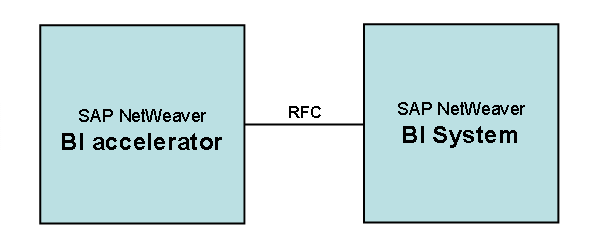
The following graphic depicts the relationship between the BI accelerator and the BI System:
How To Use, Install, and Update the BI Accelerator
● Use only with BI
The BI accelerator is based on TREX technology. For the BI accelerator, you require an installation based on a 64-Bit architecture. The hardware partners deliver this variant in preconfigured form as the BI accelerator box. You must note that a TREX installation configured for searching metadata and documents based on a 32-Bit architecture cannot be used for the BI accelerator. In turn, you cannot use a BI accelerator box to search metadata and documents. In order to use both the search functions and the BI accelerator, you require two separate installations.

You cannot use the BI accelerator for the regular TREX search and classification functions.
In order to use the preinstalled BI Accelerator Box, you must enter the fixed RFC destination defined for this purpose (default: TREX_HPA) in table RSADMINA.
● Installation on preconfigured hardware
The BI accelerator is a special LINUX 64-Bit version of SAP NetWeaver Search and Classification (TREX), which is delivered on preconfigured hardware. All installation and configuration steps will be done during the preconfiguration of the hardware by the hardware vendor.
● Download update from SAP Service Marketplace
BI customers have to update and patch the BI accelerator. They can download the updates and patches for the BI accelerator from the SAP Service Marketplace service.sap.com/swdc → Download → Support Packages and Patches → Entry by Application Group → SAP NetWeaver → SAP NETWEAVER → SAP NETWEAVER 04s → Entry by Component → Search and Classification (TREX) → TREX 7.0 → Linux on x86_64 64bit

For more information about the BI accelerator, see the following SAP notes:
■ 883726 Central Note BI accelerator
■ 875400 Installing SAP NetWeaver BI accelerator
■ 883725 Updating SAP NetWeaver BI accelerator
■ 902533 HowToGuide Connecting/Operating BI Accelerator Box
■ 984034 BI Accelerator High Availability
BI accelerator: Preconfigured Blade System
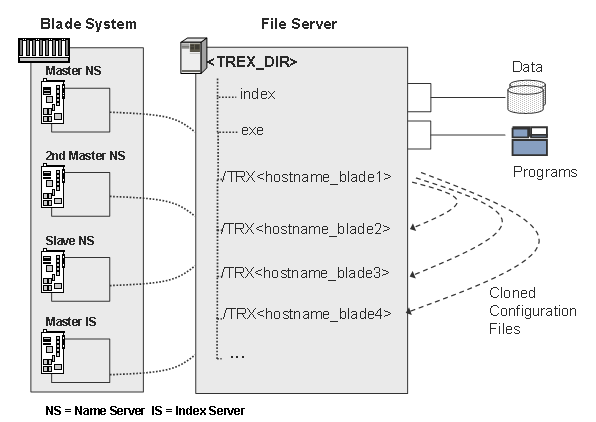
The BI accelerator is installed on a preconfigured blade system. A blade system consists of hosts in the form of server blades. The server blades are connected to centralized disk storage. This is referred to here as a file server, regardless of the underlying hardware.
The special feature of a TREX installation on a blade system is that both the TREX software and the TREX data can be stored centrally. This means that the software is installed only once on the file server. Maintaining the system is efficient because you have to implement software updates once only.
All server blades on which TREX is running access the same program files. However, each server blade has its own configuration files. The configuration files in the directory <TREX_DIR> are only used as templates. A script creates a separate subdirectory for each server blade and copies the configuration files to this subdirectory. The graphic below depicts how data, programs, and configuration files might be stored in a BI accelerator blade system.