
 Code Templates

Use
The new Front-End Editor has a functional shell for creating and applying code templates. The templates significantly reduce the amount of routine coding.
Features
The editor has a number of predefined code templates. They are suggested by code hints. Whenever you see the § symbol in a code hint, you can insert a predefined template by pressing Ctrl + Enter.

Code Template Suggested by Code Hint
The code templates have built-in runtime tags for:
● Cursor Position
● Date / Time
● Clipboard Contents
● Surrounded Text
● Document name
You can also define interactive tags like name of a class or name of a method, which you need to specify when you insert the template.
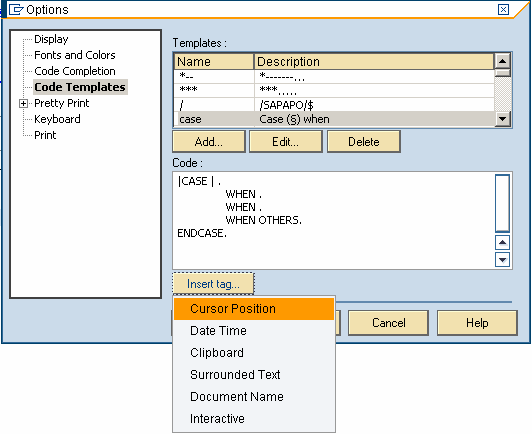
Variables in Code Templates
Activities
● Edit an existing template
In the right-hand corner of
the screen, choose Options ( ) → Code
Templates. From the list of available
templates, choose the one you want to modify. After you have applied your
changes, choose Apply. You can insert any of the
available predefined tags, your own interactive tags and type any code you
like.
) → Code
Templates. From the list of available
templates, choose the one you want to modify. After you have applied your
changes, choose Apply. You can insert any of the
available predefined tags, your own interactive tags and type any code you
like.
● Create a new template
In the right-hand corner of
the screen, choose Options () → Code
Templates → Add... Enter a shortcut name for
the template (coincides with the description of the template). After you have
applied your changes, choose Apply. You can insert any of the
available predefined tags, your own interactive tags and type any code you
like.
● Extract template from a selected text
In the source code, select the text you want to save as a template and in the context menu, choose Format → Extract Template. Enter a shortcut name for the template (coincides with the description of the template). After you have applied your changes, choose Apply.
● Surround by template
In the source code, select the text you want to surround by a template and in the context menu, choose Format → Surround by template → <Name of a suitable existing template>.
See also: