
 Step Loop

Integration
The Step Loop screen element is mapped onto the Web Dynpro UI element MultiPane.
MultiPane Mapping Rules
MulitPane Property |
Bound to Context |
Value |
AccessibilityDescription |
|
INITIAL |
ColumnCount |
|
Constant 1 |
DataSource |
Node with same ID than Multipane |
A 0:n node that contains the data for the MultiPane element. The data for the UI elements in the MultiPane is contained in subnodes of this node. |
EmptyText |
|
INITIAL |
Enabled |
|
Constant True |
FirstActualPane |
Attribute TC_TOP_LINE |
First visible line in the step loop. |
FirstVisiblePane |
Attribute TC_TOP_LINE |
First visible line in the step loop. |
Height |
|
Height (in em) of the step loop at design time. |
PaneCount |
Attribute PANE_COUNT |
Number of visible panes. |
Tooltip |
|
INITIAL |
Visible |
|
Constant True |
Width |
|
Width (in em) of the step loop at design-time. |
Context Structure
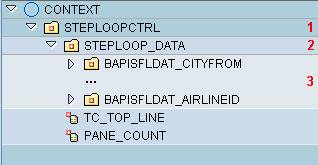
Context Structure of the MultiPane
The context node for a MultiPane (marked with 1 in the figure above) contains the following elements:
· A node with cardinality 0:n for the step loop data (2 in above figure), which is used as the data source for the MultiPane UI element.
This node contains one subnode (3 in above figure) for each UI element in a step loop line.

The attributes TC_TOP_LINE and PANE_COUNT belong to the multipane’s context node and not to the data node.