 Object Editor
To display or edit an object, open it in the object editor.
If you have opened multiple objects, the different object editors are displayed as tab pages. The tab page index (with the names of the objects and icons for the object types) is positioned at the bottom of the window.
You can call the object editor for an object as follows:
Create a new object
Open an object in the navigation area by double-clicking
Drag an object from the navigation bar to the work area of the application window by using drag and drop
Double-click an object reference (forward navigation)
Structure of the Object Editors
All object editors have the same basic structure for all object types (see graphic).
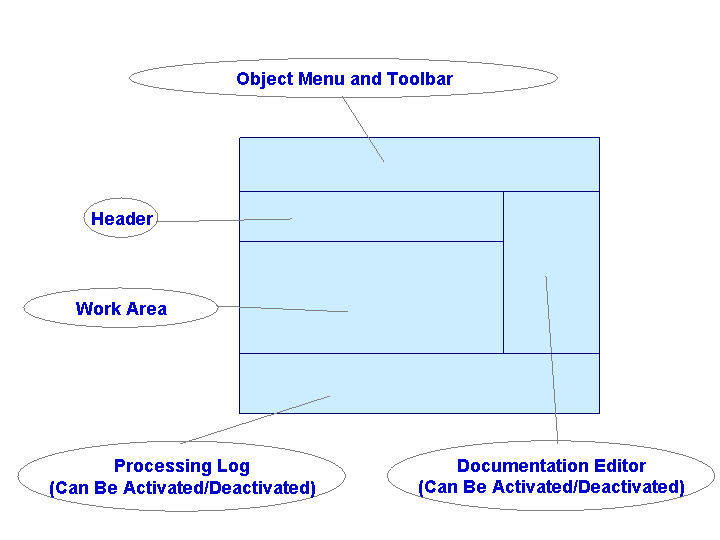
Header
The header displays the following information about the object.
Object Key
The object key depends on the object type and is defined when you create an object.
For more information, see: Object Key in Configuration Objects
Description
Contains a language-specific short description for the object. The maximum character length is 250 characters.
For more information, see: Editing Language-Specific Text
Status
Displays the status of the object.
For more information, see: Change Lists
Choose  View
View  Header
  to show or hide the header area.
Work Area
In this area you can display and edit the object. This area contains the object-type-specific functions and information.
The work area is specially adapted to the individual object type. For more details, see the documentation for the object type.
Documentation Editor
This area displays the object documentation. You can show or hide this area as required.
Choose View Documentation to show or hide the documentation editor.
For more information, see: Editing Language-Specific Text
Maintenance Log Display Area
This area displays the maintenance log. You can show or hide this area as required.
Choose View Processing Log to show or hide the processing log.
For more information, see: Checking Objects
Functions of the Object Menu Bar
Each object editor has an object menu bar, which you can use to access all functions that relate to the object you have opened.
 Note
Note
You can detach the object editor from the application window of the Integration Builder. To do so, choose View Detach Window .