
 Analyzing Selection Texts

Use
You use this procedure to find missing or obsolete selection texts.

This procedure is more practical than the normal selection text maintenance procedure, but it does not let you include texts from the ABAP Dictionary.
Prerequisites
You have defined one or more selection screens for the program.

No selection texts have been defined for the following program:
PROGRAM TEXT_ELEMENTS_4.
TABLES SBOOK.
PARAMETERS: PARAM(10).
SELECT-OPTIONS: SEL1 FOR SBOOK-CARRID,
SEL2 FOR SBOOK-CONNID.
Procedure
...
1. In the Object Navigator (transaction SE80), open the program you want to edit.
2. Activate the program and all its includes.
3. In menu bar, choose Goto → Text Elements → Text Symbols.
The ABAP Text Elements screen appears.
4.
In the application
toolbar, choose  with the quick info text Analyze Selection Texts.
The Compare Selection Texts screen appears:
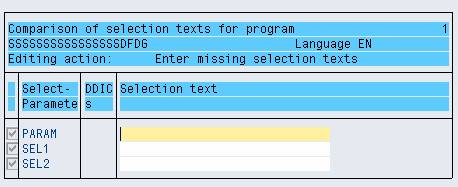
Here you see the parameters and selection options for which you have not entered any selection texts.
5. If you do not want to use texts from the ABAP Dictionary, enter your own texts.
6. Select the lines that you want to analyze.
7. Choose the Edit marked text pushbutton.
The changed lines and the selected lines are included in the analysis.
8. If you choose Save, the selection text for SEL1 is included in the text pool.
Result
In this case, both SEL1 and SEL2 were changed but only SEL1 was selected, so only SEL1 is included in the analysis. You can edit the selection texts for all of input fields on a selection screen by using the Analyze function.
If you want to use ABAP Dictionary texts as selection texts, see Maintaining selection texts.