Assignment of Search Helps to Screen
Fields
Assignment of Search Helps to Screen
Fields

Use
A search help can influence the behavior of a field when the input help is called. To do this, the search help must be assigned at first to the desired field. You have the following options for this assignment:
● Attach the search help to a data element
● Attach the search help to a check table
● Attach the search help to a table field
● Attach the search help to a screen field
More than one search help can be assigned to a field. Conflicts when calling the input help are resolved with a hierarchy of search help attachments.
Example
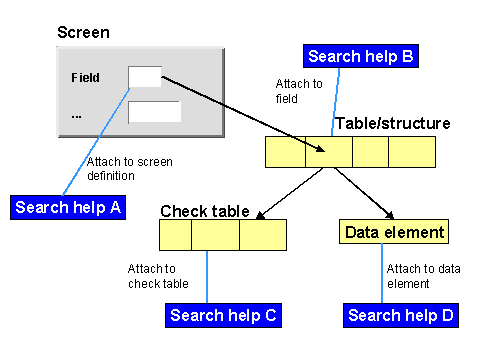
In the following figure you see an example where four search helps are assigned to a field. Search help A is assigned directly to a field on the screen. Search help B is attached to the corresponding table field. There is a check table for the field to which search help C is attached. Search help D is attached to the data element of the field.