
 bgRFC Monitoring
Use
You can use the monitoring functions to get an overview of bgRFC calls as an administrator.
Prerequisites
You require the authorization object S_BGRFC for monitoring or customizing activities.
Features
In addition to displaying the individual units and queues, the monitors offer the following functions:
· The first function module can be displayed for each unit. This function is only offered to units that were created according to the new procedure.
· Destinations and queues can be locked dynamically from the monitor. This function is only intended for analysis and not for regular operations, because it has consequences for runtime. If a queue is to be locked, then the lock refers to the top unit that uses this queue. As soon as the unit lock is removed, the queue is released again.
· It is possible to delete units and queues. Unlike the classic procedure, any dependencies are retained by this deletion process, since the units are first flagged and only then deleted by the scheduler.
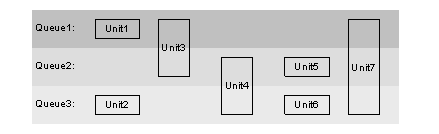
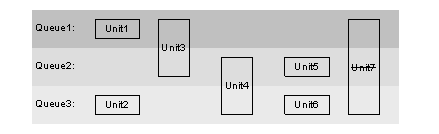
After Unit4 is deleted, Unit6 can only be executed after Unit3, since Unit4 is only deleted after the scheduler has processed Unit3. If you delete queue2, the following situation arises:
Activities
Unit6 is executed after Unit2. All flagged units are deleted by the scheduler.

Deleting a queue or unit is always risky. In our examples, it could occur that Unit6 encounters an error or causes a database inconsistency in the target system, since the required preparations in Unit4 were canceled by the deletion.
Creating a Supervisor Destination
You only need to define this setting once. A supervisor must exist before bgRFC can run.
Use
You can use this transaction to define a supervisor destination for bgRFC processing. The supervisor destination gets the configuration settings (see the subsequent steps under “Configure Scheduler”) and starts or stops the schedulers as required on each application server.
Prerequisites
You have used transaction SM59 to define the supervisor destination as an RFC destination. This destination must be defined as either an ABAP connection or a logical connection. The following prerequisites must be met.
ABAP connection:
No load balancing must be defined.
No system number must be entered.
No server must be entered.
Logical connection:
Only "NONE“ or nothing must be entered as a reference for the logical connection.
A user, password, and client must be entered for both connection types. This user must have the appropriate authorizations.
Procedure
Enter the name of the RFC destination in the “Destination Name” field and choose “Save”.
This destination is then locked in transaction SM59, which means that it cannot be modified or deleted. If you want to change the destination, you must first create a new destination in transaction SM59 and then enter the required name as a supervisor destination. The previous destination is then unlocked in transaction SM59.
Example
If, for example, you have changed the setting for the maximum number of schedulers, the supervisor destination has the task of implementing these settings on all application servers.