 Eventing for UI Element FlashIsland
Starting point is the example of a bar chart described in Data Transfer for FlashIsland.
Prerequisites
The same SWF file exists as used in the data transfer example. Here there is an additional feature that allows you to drag the bars in order to change values in the FlashIsland.
Activities
In this case the bar is changed using the eventing FlashIsland in the Web Dynpro application. This means that in the FlashIsland an event is triggered when the bar is dragged, and this event transfers parameter company as a string ,and parameter otd as a floating point. The event is called onClickBarchart.
In the Web Dynpro application aggregate a GACEvent for the FlashIsland UI element.
The following properties of the GACEvent must have values:
name
onClickBarchart
 Caution
Make sure the names are the same.
End of the caution.onAction
Relevant Web Dynpro action
For this GACEvent aggregate GACEventParameter, whose name property has the same name in the FlashIsland (company and otd) and whose type property matches the expected type (company would be a string, while otd would be a floating point variable).
The ID of this UI element is not important, and is of no interest to the Web Dynpro application nor to the FlashIsland.
You can get the parameters in Web Dynpro in the action handler method for WDEvent using method GET_DATA.
This may appear as follows:
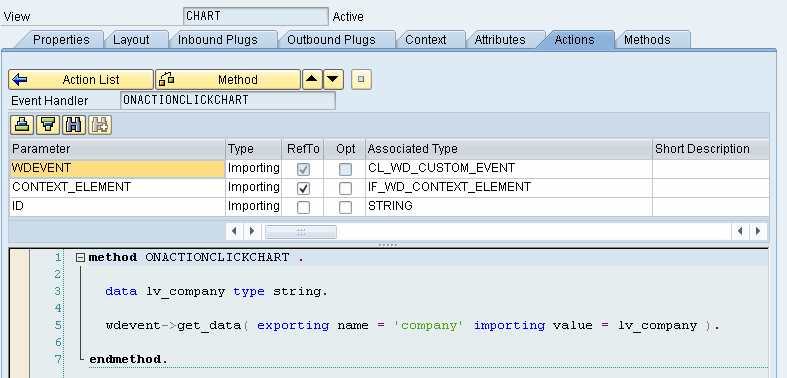 (Example of GET_DATA)
Activate the component and the view, an start the application.