 Performance Monitor
The performance monitor is used to check the general performance of Web Dynpro applications. The monitor does not provide detailed information, it just gives a rough assessment of performance.
 Caution
Do not use the performance monitor for accurate performance measurements. You use it to get an overall view of whether performance is satisfactory or whether further performance analyses are necessary.
The performance monitor shows information about the following areas:
Overview information
Performance
Memory
Rendering
System Information
Procedure
You can activate the performance monitor for the required application in the browser by using the URL parameter sap-wd-perfMonitor=X.
By default, the performance monitor is displayed in collapsed state.
You can expand the performance monitor by choosing the  (Expand) icon, and additional information will then be displayed.
You can close the performance monitor by choosing the  (Close) icon.
Features
Overview
Here you can display overview information about your system. This includes:
System ID (with client)
Host
User name
Logon language
Activation or deactivation of accessibility settings
Unified rendering version
Installed software components
Example
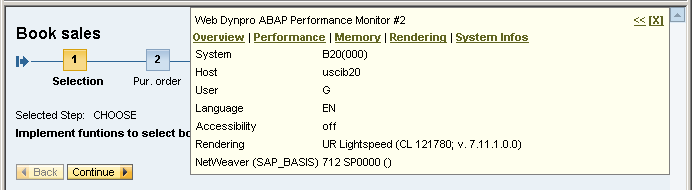 (Example of Performance Monitor Overview)
Performance
Memory
Value Calculation |
Use |
Possible Problems |
|---|---|---|
Total amount of work process memory consumed that was calculated in the last phase of the Web Dynpro Framework. |
Check whether memory consumption is OK. |
Maximum memory consumption in the interaction step and the assigned memory could be significantly higher. |
Maximum Memory in Step
Value Calculation |
Use |
Possible Problems |
|---|---|---|
Total amount of memory used in the interaction step, which was calculated in the last phase of the Web Dynpro Framework. If the page size (Page Size) is displayed directly after the value, then the value is a multiple of the page size. See also profile parameter em/blocksize_KB: Segment Size for the Extended Memory Otherwise, the value is exact. For SAP NetWeaver 7.10 and higher, you can activate the exact display by setting the value TRUE in the stat/high_resolution_memory profile parameter.
This setting for stat/high_resolution_memory also affects the memory consumption values in transaction STAD. End of the note. |
If the maximum memory consumption for the interaction step is considerably larger than the memory assigned, check whether there are memory problems in your application. |
The memory can be larger than necessary due to the rounding off of the segment size. |
 Note
NoteEnd2End Time
Value Calculation |
Use |
Possible Problems |
|---|---|---|
Time needed for the request |
Check whether there is a problem with the end–2–end time for the application. The end-2-end time is affected by the following factors:
|
See client time |
Server time
Value Calculation |
Use |
Possible Problems |
|---|---|---|
AS-ABAP server CPU time calculated in the last phase of the Web Dynpro Framework. |
Check whether this is a problem with the server processing time |
|
Client Time
Value Calculation |
Use |
Possible Problems |
|---|---|---|
Estimated elapsed browser time measured using JavaScript |
Check whether the size and setup of the Web Dynpro application conforms to Performance Guidelines. |
|
Response Data
Value Calculation |
Use |
Possible Problems |
|---|---|---|
Content of the AS-ABAP HTTP response for the user interaction |
Check the values for the response. Large values for a response (for example, >300kB) can be an indicator for slow server and client times. |
|
Example
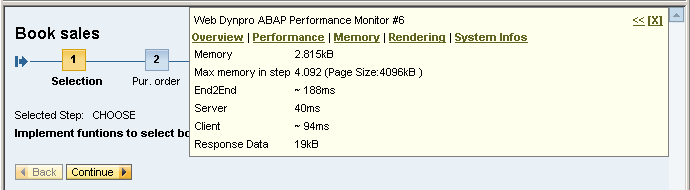 (Example of Performance Monitor Performance)
Memory
Write Memory Snapshot
Saving a memory snapshot of the application, which can be displayed in transaction S_MEMORY_INSPECTOR.
More information: Memory Analysis
Example
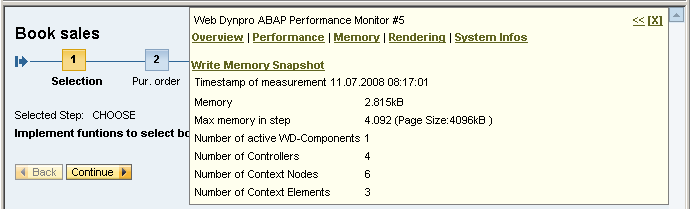 (Example of Performance Monitor Memory)
Rendering
UR: Show/Save ...
Saving the displayed page as a UR test suite / LSX file.
Example
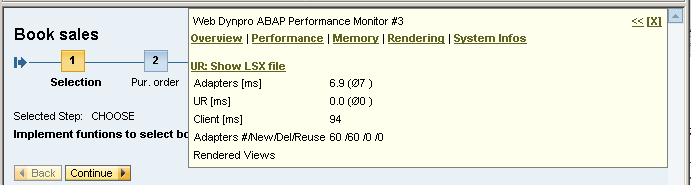 (Example of Performance Monitor Rendering)
System Information
Display of detailed information about the system
System ID
Database
Operating system
Release number of SAP system
Kernel version
Installed software components
Example
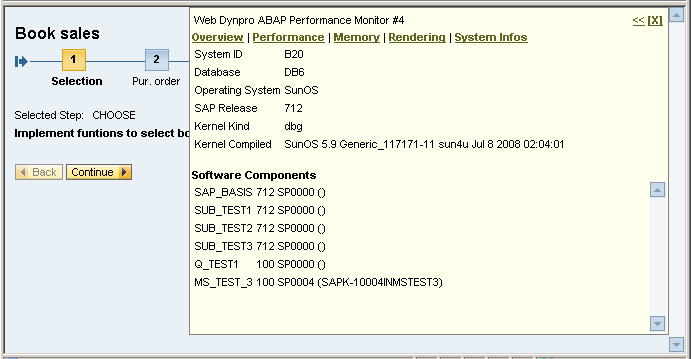 (Example of Performance Monitor System Information)