
 MenuCheckBox

This UI element provides a specific menu item for the abstract MenuItem of a Menu in the form of a checkbox.
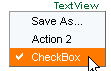
Example of the Visual Display
|
Text View with Two MenuActionItems and a MenuCheckBox |
|
|
Runtime Class |
CL_WD_MENU_CHECKBOX |
Properties in the View Designer
Name |
Type |
Initial Value |
Bindable |
STRING |
(automatic) |
No |
|
WDY_BOOLEAN |
false |
Mandatory |
|
WDY_BOOLEAN |
true |
Yes |
|
WDY_BOOLEAN |
false |
Yes |
|
Translatable text |
|
Yes |
|
WDUI_TEXT_DIRECTION |
inherit |
Yes |
|
WDY_BOOLEAN |
true |
Yes |
Events in the View Designer
Name |

Other properties that can be inherited are defined in the associated higher-level classes. The associated UI elements are:
● MenuItem
Dynamic Programming
For dynamic programming, the same properties, events, and aggregations as in the View Designer are available. Bear in mind the different spellings.
Dynamic Programming of Properties
View Designer Name |
Runtime Name |
Type |
CHECKED |
WDY_BOOLEAN |
|
ENABLED |
WDY_BOOLEAN |
|
NEEDS_MORE_INFO |
WDY_BOOLEAN |
|
TEXT |
WDY_MD_TRANSLATABLE_TEXT |
|
TEXT_DIRECTION |
WDUI_TEXT_DIRECTION |
|
textDirection inherit |
CL_WD_MENU_CHECKBOX=>E_TEXT_DIRECTION-INHERIT |
|
textDirection ltr |
CL_WD_MENU_CHECKBOX=>E_TEXT_DIRECTION-LTR |
|
textDirection rtl |
CL_WD_MENU_CHECKBOX=>E_TEXT_DIRECTION-RTL |
|
VISIBLE |
WDY_BOOLEAN |
|
Dynamic Programming of Events
View Designer Name |
Runtime Name |
ON_TOGGLE |
Example
There is a system example for this UI element in the DEMO_UIEL_MENU component in the DEMO_UIEL_MENUBAR application.