Data Types in the Context Node 
Internal and External Data Types
When editable fields are filled with values in the user interface of a business application, these characters are initially in an external format that cannot be read by the Web Dynpro ABAP application. Only when processed are these characters checked and transformed to an appropriate internal format.
Prices and Quantities
A currency or quantity reference field must always exist for a price or quantity input field. This reference field provides the data type for the internal format. For example, if 50 is entered in an input field, the value of the reference field determines whether this means 50 dollars or 50 Japanese yen. No checks can be made (for example, the correct number of decimal places) until the correct data type has been determined.
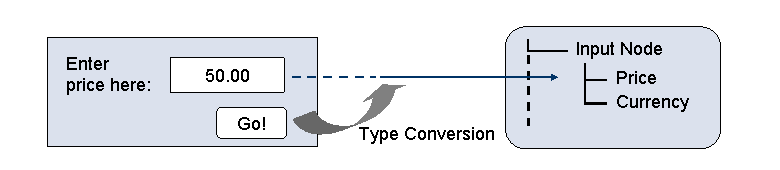
Data and Data Types: Price and Currency
 Note
Note
The context attribute for the value of the input and the context attribute for the currency must share a node (here the node input_node). Otherwise the value cannot be assigned to the data type.
If, for example, you use a wizard to generate the node from an existing ABAP Dictionary structure, the required reference of the value attribute to the data type attribute is created automatically, since the reference structure is usually the same as the ABAP Dictionary structure. In very rare exceptions, however, the reference structure can be taken from a different ABAP Dictionary structure. In this case, the reference structure cannot be located in the node created by the wizard and the reference type is unknown at runtime. You must configure the reference manually. To enable this, the interface IF_WD_CONTEXT_NODE_INFO includes the method SET_ATTRIBUTE_REFERENCE_FIELD. If a reference field does not exist at runtime or is not recognized, a default format (with two decimal places) is applied.
A price or quantity field can have the following values:
a packed number
(in BCD format)
a DECFLOAT field
For more information about specifying currencies, see the ABAP documentation in the system.
Note
Since the application may at some point be required to handle currencies that do not use two decimal places (such as the Japanese yen), you must run comprehensive tests on the application programs.
Additional Notes
The following gives you some useful background information about data types in context nodes and their conversion from input to output.
Data Input
All data input is checked and transformed in accordance with the referenced data type. Corrections may be made, such as when the year in a date was entered as two digits and the two missing digits are obvious and can be added.
Conversion exits are called automatically. Any conversion errors are displayed.
For prices and quantities, the system first finds the reference field and then converts the input accordingly.
If a value set exists for the attribute whose value is entered by the user, the system compares the value to a fixed set of values during conversion: If the value set is specified in a table, this is not considered. However, the programmer can store a separate value set for the context node info class (see IF_WD_CONTEXT_NODE_INFO).
Conversions from external formats to internal formats retain any space characters in string and character input. This is not the case for other data types, unless the format has been modified explicitly by the application developer.
Mandatory fields are not checked.
The CL_WD_DYNAMIC_TOOL=>CHECK_MANDATORY_ATTR_ON_VIEW method is made available to application programmers for implementing mandatory field checks. For more information about this method, see the corresponding method documentation in the system.
Data Output
Internal data formats are also converted to external data formats automatically. The conversion includes any local user settings, such as local output formats or dates and times.
Any conversion exits declared in the data element are called.
Digits are displayed with or without a leading zero, depending on the data type.
Depending on the data type you can use the context editor to change some formatting properties (see below) of context attributes.
If the output consists of packed numbers, the sign is placed to the right of the number by default. All other data types place the sign on the left.
Pretty Print Options
You can set special formatting properties using the context editor or the methods GET_ATTRIBUTE_FORMAT_PROPS and SET_ATTRIBUTE_FORMAT_PROPS of IF_WD_CONTEXT_NODE_INFO.
Format |
Possible Values |
Data Types |
|---|---|---|
Display leading zeros |
Zeros as blank spaces Keep zeros Standard value |
P NUMC |
Position of the leading sign |
Leading sign left (standard for I) Leading sign right (standard for P) Standard value |
I P |
Input compression |
Compress input Do not compress input Standard value
By default, compression takes place except for Char and String. End of the note. |
Char String |
Time output format |
with seconds (standard) without seconds |
T |