
 PageHeader

With the PageHeader, you can create a heading for a page. Any number of UI elements can be displayed below the heading in the PageHeaderArea. In the example below, TextViews are shown.
Example of the Visual Display
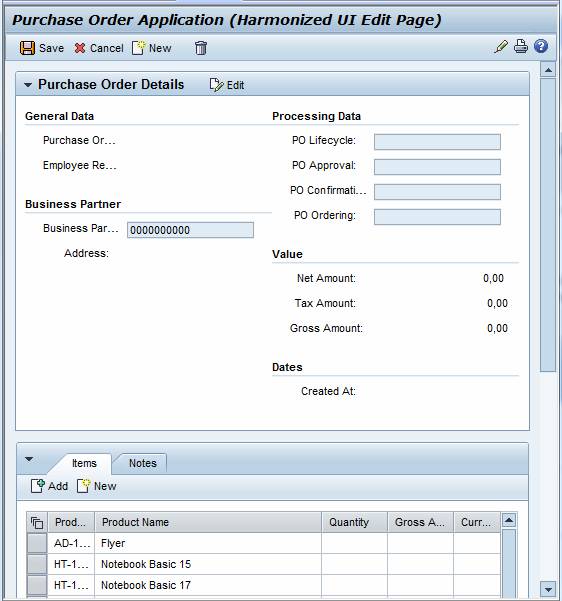
PageHeader and SAP NetWeaver Business Client
The application can create a PageHeader as described below (irrespective of the Help Center). If the application is then called in the SAP NetWeaver Business Client (NWBC), the PageHeader is not rendered. The title is displayed in the NWBC instead.
To do this, the following conditions must be met:
● The NetWeaver Business Client is active
● PageHeader.id = 'PAGE_HEADER'
● PageHeader.titleContent = titleContent (TransparentContainer)
● titleContent.id = 'PAGE_HEADER_LINKS'
● titleContent.children = { helpLink (LinkToAction), persLink (LinkToAction) )
Note that helpLink and persLink are both optional.
● helpLink.id = 'PAGE_HEADER_HELP_LINK'
● helpLink.menu = { }
● persLink.id = 'PAGE_HEADER_PERS_LINK'
● persLink.menu = { }
More information: Help Texts in and for Web Dynpro Applications.
PageHeader in Embedded View
In addition, an NWBC PageHeader may be contained in an embedded view. This allows you to realize a PageHeader in a reusable component or view.
To do this, the following prerequisites must be met:
● This function can only be used to embed a view in the main view of the application.
● The ViewContainerUIElement must be a direct child element of the ROOTUIELEMENTCONTAINER.
● ViewContainerUIElement.id = 'PAGE_HEADER'
● The rules specified above are valid for the embedded view.
Details
Runtime Class |
CL_WD_PAGE_HEADER |
Properties in the View Designer
Name |
Type |
Initial Value |
Bindable |
STRING |
(automatic) |
No |
|
WDUI_CONTEXT_MENU_BEHAVIOUR |
inherit |
No |
|
WDY_MD_UI_ELEMENT_REFERENCE |
|
No |
|
WDUI_PAGE_HEADER_DESIGN |
standard |
Yes |
|
WDY_BOOLEAN |
true |
Yes |
|
WDUI_TEXT_DIRECTION |
inherit |
Yes |
|
Translatable text |
|
Yes |
|
Translatable text |
|
Yes |
|
WDUI_VISIBILITY |
visible |
Yes |
Aggregations in the View Designer
Name |
Cardinality |
Type |
0..n |
||
0..1 |

Other properties that can be inherited are defined in the associated higher-level classes. The associated UI elements are:
Dynamic Programming
For dynamic programming, the same properties, events, and aggregations as in the View Designer are available. Bear in mind the different spellings.
Dynamic Programming of Properties
View Designer Name |
Runtime Name |
Type |
CONTEXT_MENU_BEHAVIOUR |
WDUI_CONTEXT_MENU_BEHAVIOUR |
|
contextMenuBehaviour: inherit |
CL_WD_PAGE_HEADER=>E_CONTEXT_MENU_BEHAVIOUR-INHERIT |
|
contextMenuBehaviour: provide |
CL_WD_PAGE_HEADER=>E_CONTEXT_MENU_BEHAVIOUR-PROVIDE |
|
contextMenuBehaviour: suppress |
CL_WD_PAGE_HEADER=>E_CONTEXT_MENU_BEHAVIOUR-SUPPRESS |
|
CONTEXT_MENU_ID |
WDY_MD_UI_ELEMENT_REFERENCE |
|
DESIGN |
WDUI_PAGE_HEADER_DESIGN |
|
design: small |
CL_WD_PAGE_HEADER=>E_DESIGN-SMALL |
|
design: standard |
CL_WD_PAGE_HEADER=>E_DESIGN-STANDARD |
|
ENABLED |
WDY_BOOLEAN |
|
TEXT_DIRECTION |
WDUI_TEXT_DIRECTION |
|
textDirection: inherit |
CL_WD_PAGE_HEADER=>E_TEXT_DIRECTION-INHERIT |
|
textDirection: ltr |
CL_WD_PAGE_HEADER=>E_TEXT_DIRECTION-LTR |
|
textDirection: rtl |
CL_WD_PAGE_HEADER=>E_TEXT_DIRECTION-RTL |
|
TITLE |
WDY_MD_TRANSLATABLE_TEXT |
|
TOOLTIP |
WDY_MD_TRANSLATABLE_TEXT |
|
VISIBLE |
WDUI_VISIBILITY |
|
visible: none |
CL_WD_PAGE_HEADER=>E_VISIBLE-NONE |
|
visible: visible |
CL_WD_PAGE_HEADER=>E_VISIBLE-VISIBLE |
|
Dynamic Programming of Aggregations
View Designer Name |
Runtime Name |
Cardinality |
AREAS |
0..n |
|
TITLE_CONTENT |
0..1 |
Example
You can find an example of this UI element in the system in the WDR_TEST_UI_ELEMENTS Web Dynpro application.