
 Displaying the Cache State

Use
The cache state display provides an overview of the different regions and cache objects.
The display is divided into the following areas, which you can select with pushbuttons:
● Summary
● Region Overview
● Details of Region Configuration
● Delete
Aggregated information about the current cache state is displayed in the summary (see graphic below). Information includes the current fill level, the number of configured regions, and the region size.
Procedure
On the initial screen of the VMC system administration (SM53) in the structure on the left side under Navigation choose Cache Info → State.
The
pushbuttons for the details of each area appear on the right. Choose  Cache Summary and the screen below
appears:
Cache Summary and the screen below
appears:
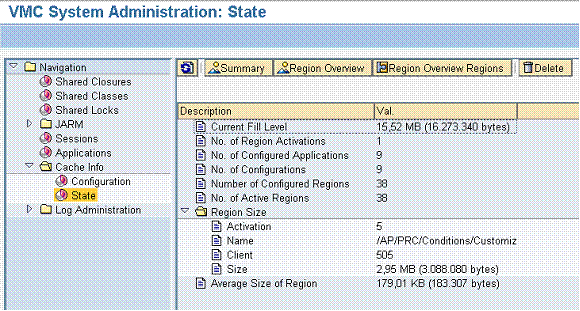
SM53: Cache State Display (Summary)
The subareas are explained below.
Summary
The summary displays aggregated information about the current cache state. For example, the current cache fill level, the number of configured cache regions, and the largest cache region are shown.
Region Overview
The region overview
displays a table containing the regions. For all regions the corresponding
activation (see
 Life Cycle of Applications
Running), client (if the region is client-dependent), size,
application name, and configuration name are displayed.
Life Cycle of Applications
Running), client (if the region is client-dependent), size,
application name, and configuration name are displayed.
Details of Region Configuration
Here regions are displayed in hierarchical parent/child relationships. In addition, the cache groups and their corresponding element configurations are displayed. You must also be aware that region sizes are accumulated, meaning that the size of the parent region is the sum of all its child regions.
For more information, refer to Displaying the Cache Configuration.
Cache Statistics
Beneath this overview all the statistical data of the cache is summarized. See Displaying Cache Statistics
Delete
With the
 pushbutton all regions contents are deleted.

Note that just the contents of the regions are removed - the regions themselves are not deleted.
Choose  Refresh to update the display.