
 VMC System Administration

Use
With the
VMC System
Administration
(transaction SM53) you can monitor all the settings in the environment of the
 SAP Virtual
Machine Container (VMC) and carry out administration tasks. The transaction is intended for use by
administrators, SAP consultants, and SAP support.
SAP Virtual
Machine Container (VMC) and carry out administration tasks. The transaction is intended for use by
administrators, SAP consultants, and SAP support.
Integration
In transaction SM52 you can see an overview of all the running Java VMs in the VM Container (see VM Overview).
Prerequisites
You need authorization for the transaction. This is configured in authorization object S_VMCADMIN.
Profile S_VMCADMIN_1 gives display and change authorization. Profile S_VMCADMIN_2 only gives you display authorization.
Features
The initial screen of VMC System Administration (transaction SM53 or in the VM Overview choose Goto → VMC Administration) looks like:
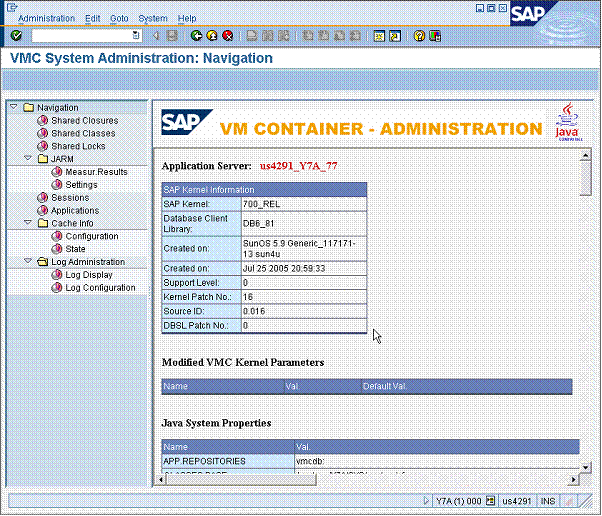
The right-hand screen provides the following information:
● Details of the application server instance you are on, such as kernel release and patch level.
● Modified Kernel Parameters: If you have changed the Configuration Parameters from the default you will see these here.
● Java System Properties: All Java system properties of the instance
● VM Build Options: Settings used to translate the Java VM

All the
information relates only to the instance you are logged on to. If you are monitoring or want to carry out
administrative tasks on a different instance, you can get an overview in SM51
(
Over of SAP
Application Servers), and navigate to the instance you want be
double-clicking on it.
When you select something in the navigation structure on the left-hand side, you can see in the right-hand area the associated information. The navigation structure contains the areas below:
● Shared closures, shared classes and shared locks are the VMC components that are located in the shared memory and can be used by all VMs. For more information, see the following sections:
...
○
Display shared
locks: You can use this display for dead lock analyzes to find out what sort
of
Shared
Locks have been created. Sometimes there may be so many of them, which could
also cause problems.
● Sessions: Here you can manage user sessions.
More information: Displaying and Managing Sessions.
● Applications: You can see details of all Java applications running on this instance.
More information: Displaying Applications
● Single Activity Trace: You can trace individual calls in order to perform detailed analyses.
More information: Single Activity Trace
● JARM is used for statistical monitoring of Java applications.
More information: JARM in the VM Container
● Under Cache Info you can configure the cache and monitor its state. In particular with CRM applications a lot of use is made of the cache.
More information: JARM in the VM Container
● Log Administration is used for displaying and configuring the log viewer.
More information: Logging and Tracing in the VM Container
● JIT Compiler: Here you can find configuration and statistical information about the Just-in-Time Compiler of the SAP VM Container.
More information: JIT Compiler: Configuration and Statistics
● Profiling: With VMC profiling you can analyze the process and resource consumption of a Java application.
More information: Profiling in the VM Container