
 Filesystems Monitor

Use
This monitor
displays a section of the Operating System
Monitor, which displays all of the values collected by the operating
system collector SAPOSCOL. You can use this monitor to monitor application
servers and host systems of your choice and to check whether there is still
enough free disk space available. The values are collected by the
 operating system
collector SAPOSCOL. You can also monitor this data with the
operating system
monitor, which is assigned as the analysis method for most of the nodes of
this monitor.
operating system
collector SAPOSCOL. You can also monitor this data with the
operating system
monitor, which is assigned as the analysis method for most of the nodes of
this monitor.
Prerequisites
To be able to
display operating system data for a particular server with this monitor, the
operating system collector SAPOSCOL must be installed on that server (see
Installing the
Operating System Collector SAPOSCOL).
Features
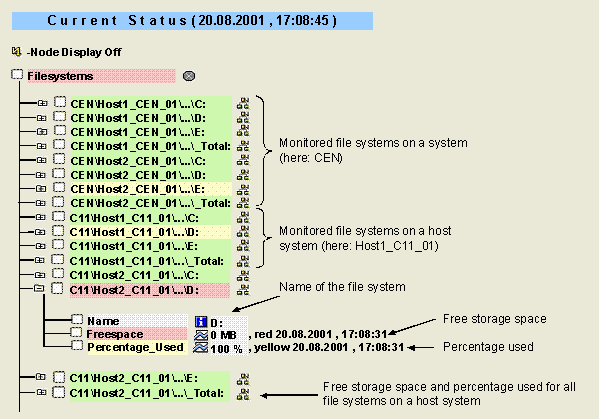
The monitor contains the following monitoring tree elements (MTEs):
MTE Name |
Meaning |
Name |
Name of the file system |
Freespace |
Free disk space in the file system |
Percentage_Used |
Usage of the available storage space for the file system as a percentage |

You can
explicitly exclude file systems from the operating system collector
monitoring. For more information, see
Central Monitoring of
Operating System Data.
Activities
To start the monitor, follow the procedure below:
...
1. Start the Alert Monitor using transaction RZ20 or choose CCMS→ Control/Monitoring → Alert Monitor.
2. On the CCMS Monitor Sets screen, expand the SAP CCMS Monitor Templates set.
3. Start the Filesystems monitor from the list by double-clicking it.