
 Troubleshooting Using Monitoring
Tools
Troubleshooting Using Monitoring
Tools

Use
The system administrator has the task of analyzing and removing errors that occur during the processing of a Web service.
Procedure
Proceed as follows in order to find the error message that occurred during abnormal termination of a service.
...
1. Start transaction SM21, choose the required time frame and the problem class Problems and Warnings.
2. Call the Monitor for the Web Service Runtime in transaction RZ20. Here you can set the system so that you receive a message whenever an error occurs.
3. In the NetWeaver Administrator or in transaction SOAMANAGER, display the logs and traces.
Below you will find an example that explains how to proceed.
...
1. Choose Display Logs and Traces. The output is as follows:
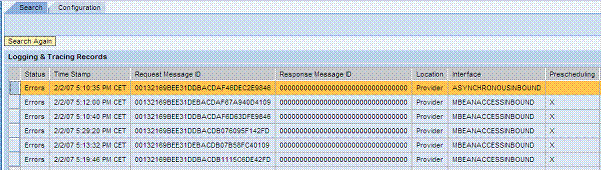
2. Choose an entry from the list and analyze the details.

In the Logging and Tracing Records, you will find information on the error that occurred. In this example, the error occurred in sequence processing in the method listed under Location.
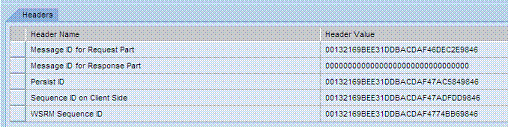
In the Header Data tab, you will find other important information on the message ID, the sequence ID, and the status of the message and the sequence.

3.
Copy the GUID that
is listed in the line Message ID for Request Part and use it for the
selection in the message monitor (refer also to
 Message
Monitoring).
Message
Monitoring).
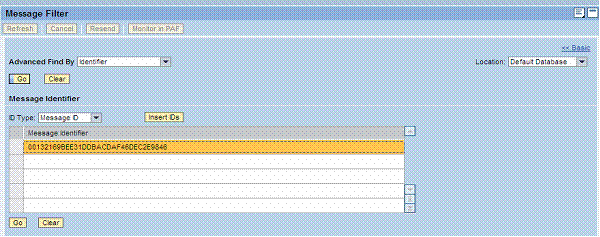
4. Select the error message and analyze the details.

To analyze
the error, call up the
bgRFC Monitor and
the sequence monitor in order to check the sequence status (see also: Monitoring
Sequences).
5. Start the sequence monitor (see also: Monitoring Sequences). Enter the Sequence ID on Client Side (see the screen above) in the Logical Sequence ID field under Special Search Criteria. Now you can analyze the sequence.