
 Receiver Determination

The Web Service for a receiver determination is described by the external definition ReceiverDeterminationService.
The external definition contains structure elements of the following table.
WSDL Description
Element |
Description |
MessageHeaderID |
Specifies object key The object key consists of the following: ● SenderPartyID: Sender party (optional) ● SenderComponentID: Sender service ● InterfaceName: Name of the sender interface ● InterfaceNamespace: Namespace of the sender interface ● ReceiverPartyID: Receiver party (optional) ● ReceiverComponentID: Receiver service
The same data structure is used for the object key for receiver determinations, interface determinations, sender agreements, and receiver agreements. |
ReceiverDetermination |
Defines the receiver determination with all attributes. ● MasterLanguage, AdministrativeData and Description, more information: Cross-Object-Type Elements ● ReceiverDeterminationID: Object key; based on the type MessageHeaderID. ● Rule: Specifies condition and receiver in a standard receiver determination; based on type ReceiverDeterminationRule. More information: see element ReceiverDeterminationRule. ● DynamicReceiverRule: Refers to a mapping in the ES Repository (enhanced receiver determination); based on type ReceiverDeterminationMapping. ● PrefixNamespaceMapping; based on type PrefixNamespaceMapping ● NoReceiverBehaviour: Specifies what happens if no receiver can be determined at runtime. Possible values: ○ Error Messages Message processing is terminated with an error. ○ Ignore: Message processing is ended as defined by your configuration settings. ○ Specified Receiver: The message is sent to a fixed predefined receiver. ● NoReceiverReceiver: Specifies a fixed receiver (party/service) when receiver cannot be determined at runtime, based on type CommunicationPartyExtractor. Specify this parameter when you have entered the value Specified Receiver for the element NoReceiverBehaviour. If you have entered the values Ignore or Error Message for the element NoReceiverBehaviour then the NoReceiverReceiver is ignored. You can find more information on how to specify the receiver in element CommunicationPartyExtractor. Using the Integration Builder you can choose between two basic ways of receiver determination : ● Standard receiver determination: here you manually specify the receiver as well as conditions for forwarding the message to the receiver. ● Enhanced receiver determination: here you specify a mapping to dynamically determine the receiver at runtime. Depending on which parameters you enter, you determine one of two ways of receiver determination: Rule parameter for standard receiver determination; DynamicReceiverRule parameter for enhanced receiver determination. For a standard receiver determination you must have at least one receiver, and for an enhanced receiver determination you must specify a mapping. |
ReceiverDeterminationRule |
Specifies the routing rule for a standard receiver determination. The routing rule consists of the following elements: ● Condition: Specifies the condition for forwarding a message to a specific receiver. For more information see element AtomicCondition. ● Receiver: Specifies receiver of message; based on type CommunicationPartyExtractor. |
Condition |
Specifies condition: A condition is constructed of sub-conditions (AtomicConditionBlock). For more information, see Structuring Conditions below. |
AtomicConditionBlock |
Specifies a block of elementary conditions. For more information, see Structuring Conditions below. |
AtomicCondition |
Specifies the contents of an elementary condition in a routing rule. A condition consists of the following parameters: ● Operator: Specifies the operator to link left and right operands. You can enter the following values: ○ EQ for equal (=) ○ NE for not equal (≠) ○ CP for contains pattern (≈) ○ EX for exist ● LeftExtractor/RightExtractor: Specifies the expression for left/right operand. More information, see Structuring Conditions below and the description of the Extractor element. |
CommunicationPartnerExtractor |
Specifies the receiver (party/service). You must enter the following parameters to specify a receiver completely: ● CommunicationParty: Specifies the expression for the name of a communication party. ● CommunicationPartySchema: Specifies the expression for the identification schema of an identifier for a communication party. ● CommunicationPartySchema: Specifies the expression for the agency of an identifier for a communication party. ● CommunicationComponent: Specifies the expression for a service (obligatory entry). All parameters are based on type Extractor. More information see AtomicCondition element. |
Extractor |
Describes the data structure for the entry of an expression in a condition. An expression consists of the following elements: ● TypeID: Specifies whether an expression is displayed as an XPath expression or by entering a context object. Possible values: XPath, Context Object, Technical Context Object, Constant, Message Header Field. Which further parameters you specify depends on the expression type. ● Value: You can specify a simple value with this parameter. ● Datatype: You can specify an XSD data type with this parameter. This is useful when a particular format is needed for the expression (for example the entry of a date in a fixed predefined date format). Possible values: xsd:string, xsd:integer, xsd:date, xsd:time ● ContextObjectName/ContextObjectNamespace: Specifies the name and namespace of the context object. |
Structuring Conditions
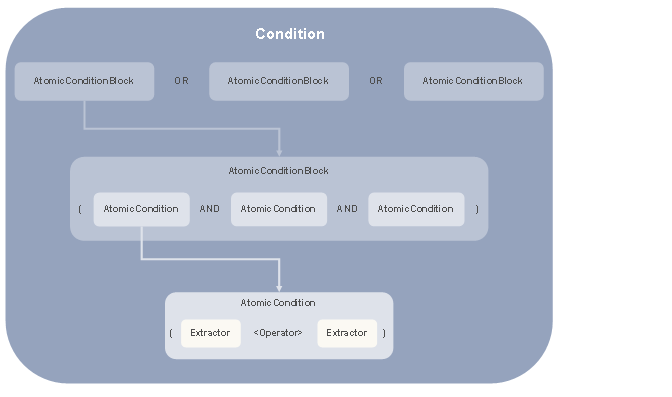
The core of a condition is the connection of an expression (Extractor) with another expression by using an operator. In an elementary condition (AtomicCondition) you connect exactly two expressions together, a left expression and a right expression (LeftExtractor/RightExtractor).
You can connect elementary conditions to blocks using the AND operator (AtomicConditionBlock). You can then connect this to a condition using the OR operator.
The figure shows how complex conditions are fundamentally set up when they are made up of several blocks of elementary conditions.
Structuring Expressions
You have several options for formulating an elementary condition in an expression.

Using TypeID element you specify how you want to define the expression.
Entering Expressions
Expression Type |
Description |
Entering a constant (TypeID = Constant) |
Enter the value in the Value parameter. |
Entering an XPath expression (TypeID = XPath) |
Enter the XPath expression in the Value parameter. |
Entering a Context Object (TypeID = Context Object) |
Enter the name and namespace of the (technical) context object or the header field from the ES Repository in the ContextObjectName and ContextObjectNamespace parameters. |
Entering a Technical Context Object (TypeID = Technical Context Object) |
|
Entering a field from the message header (TypeID = Message Header Field) |
Example of a Condition
The following condition is specified in a receiver determination taken from the SAP NetWeaver XI SingleFlightBooking demo example.
For more
information on SAP NetWeaver XI demo examples, see
 Demo
Examples
Demo
Examples
Condition: when the AirlineID field in the message payload has the value LH, then the message is forwarded to the receiver business system BUS_100. A context object of the same name from the ES Repository is used to access the AirlineID field in the message.
The receiver determination in this case contains just one block with an elementary condition (AtomicCondition) and the assignment to the receiver.
The elementary condition is expressed using the following elements (XML presentation).
<AtomicCondition>
<Operator>EQ</Operator>
<LeftExtractor>
<TypeID>Context Object</TypeID>
<Value>/p1:BookingOrderRequest/FlightID/AirlineID</Value>
<Datatype></Datatype>
<ContextObjectName>AirlineID</ContextObjectName>
<ContextObjectNamespace>http://sap.com/xi/XI/Demo/Agency
</ContextObjectNamespace>
</LeftExtractor>
<RightExtractor>
<TypeID>Constant</TypeID>
<Value>LH</Value>
<Datatype>xsd:string</Datatype>
<ContextObjectName>
</ContextObjectName>
<ContextObjectNamespace>
</ContextObjectNamespace>
</RightExtractor>
</AtomicCondition>
Example of Expressions
Entering a Field from the Message Header
<TypeID>Message Header Field</TypeID>
<Value></Value>
<Datatype>xsd:string</Datatype>
<ContextObjectName>SenderPartyAgency</ContextObjectName>
<ContextObjectNamespace>http://sap.com/xi/XI/System</ContextObjectNamespace>
Entering a Technical Context Object
<TypeID>Technical Context Object</TypeID>
<Value></Value>
<Datatype>xsd:string</Datatype>
<ContextObjectName>ProcessStep</ContextObjectName>
<ContextObjectNamespace>http://sap.com/xi/XI/System</ContextObjectNamespace>
Entering a Context Object
<TypeID>Context Object</TypeID>
<Value></Value>
<Datatype>xsd:string</Datatype>
<ContextObjectName>ConvContent</ContextObjectName>
<ContextObjectNamespace>http://xi.com/gr/conv</ContextObjectNamespace>