
 Publishing Sender Agreements in the Services
Registry
Publishing Sender Agreements in the Services
Registry

Use
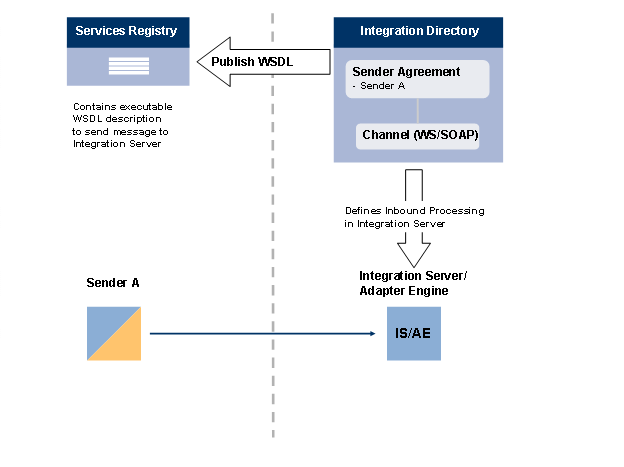
You can publish the WSDL description for a sender agreement from the Integration Directory to the Services Registry. This is useful if a business partner wants to execute a SOAP call on the Integration Server. Instead of sending the required WSDL file in an e-mail, for example, you can now publish the relevant sender agreement in the Services Registry. Since the Services Registry is normally located in front of the firewall, the business partner can access the WSDL description in the Service Registry. The WSDL description contains all the relevant configuration data from the sender agreement as well as the assigned communication channel, which are required to call the Integration Server (see figure).
Publication in the Services Registry is currently supported for sender agreements which are assigned communication channels with the following adapter types.
● SOAP (on the central or local Adapter Engine)
● WS

You can define different sender agreements in the Integration Directory for the same service interface (with different sender components). However, you can only publish one sender agreement in the Services Registry for each sender interface. If you publish a different sender agreement with the same service interface in the Services Registry, the previously published sender agreement is overwritten (following a warning).
Furthermore, you can also publish a service from an integrated configuration in the Services Registry. Since integrated configuration only supports scenarios in which messages pass through the Adapter Engine, only scenarios that use the SOAP sender adapter are supported.
More information:
 Services
Registry
Services
Registry
Prerequisites
One of the following prerequisites is met:
● You have created a sender agreement in the Integration Directory. The sender agreement references a communication channel of adapter type WS or SOAP
More information: Defining Sender Agreements
● You have created an integrated configuration. The integrated configuration is assigned a sender channel with the adapter type SOAP.
More information: Executing Integrated Configuration
Procedure
Publish a Service from a Sender Agreement
...
1. Open the sender agreement.
2. In the object editor menu, choose Sender Agreement → Publish In Services Registry.
You can define whether the URL of the Integration Server or Adapter Engine, or a different URL is displayed for the service end point in the Services Registry. In particular business scenarios, it might make sense to instead replace this sensitive information with a representative URL.
○ To publish the URL of the Integration Server or Adapter Engine, choose Publish.
○ To overwrite the URLs with a value you define, choose Options and select the Overwrite URLs During Publication checkbox. Enter the URL that you want to publish.
You can overwrite the following types of URLs:
WSDL URL Prefix: Specifies the URL that the WSDL description can be called from.
End Point URL Prefix: Specifies the URL that the Web service can be called from.
Publish a Service from an Integrated Configuration
...
1. Open the integrated configuration.
2. In the object editor menu, choose Integrated Configuration → Publish In Services Registry.
3. Proceed as described for the sender agreement.