
 Integrating Business Systems by Using the
File/FTP Adapter
Integrating Business Systems by Using the
File/FTP Adapter

The following documentation describes an integration scenario in which the business system, which is connected to the Integration Server by means of the file/FTP adapter, takes on the role of either a sender system or a receiver system, or both.
Use
Many external or legacy systems cannot exchange data by means of messages and HTTP. However, these systems often have a file interface. This file interface enables you to use the file adapter to connect such systems to the Integration Server.
See:
 File/FTP
Adapter
File/FTP
Adapter
Description
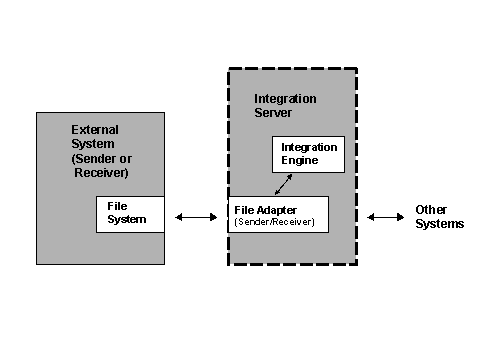
An external or legacy system is connected to the Integration Engine by means of the file/FTP adapter. The file adapter receives a file from an external system and converts it into a message, which can then be processed further by the Integration Engine.
To forward a message to an external receiver system, the file adapter receives the message from the Integration Engine, converts it into a text file and then writes this file to the file system of the external receiver system.
Example
The file/FTP adapter receives a file from an external system. This file is converted into a message and is processed further by the Integration Engine. Two receivers of the message are determined
● Another external system
● An SAP system, which is able to receive messages directly
The receiver file/FTP adapter converts the message back into a file and writes this file to the file system of the other external system. The SAP System on the other hand simply receives a message.