Debugging

Use
When you carry out debugging in an application, it is often advantageous to perform a quick check of the parameters that are transferred to and from SAP. SAP JCo provides the method writeHTML() for performing these checks. You can use this method to create an HTML file based on an object of the types.
· JCO.Function
· JCO.ParameterList
· JCO.Structure, or
· JCO.Table
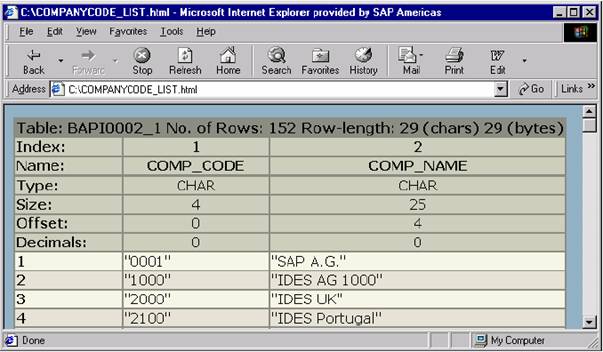
For tables, the default setting only includes the first 100 rows of the table. This saves space and avoids very large HTML files which may cause the browser to crash. If you want to output more rows, you can set the parameter jco.html.table_max_rows to control the maximum number of rows. The following diagram shows some example code:

jco.html.table_max_rows
JCO.Function function =
mRepository.getFunctionTemplate("BAPI_COMPANYCODE_GETLIST").
getFunction();
mConnection.execute(function);
JCO.Table codes =
function.getTableParameterList().getTable("COMPANYCODE_LIST");
String oldMaxRows = JCO.getProperty("jco.html.table_max_rows");
JCO.setProperty("jco.html.table_max_rows", "99999");
codes.writeHTML("c:\\COMPANYCODE_LIST.html");
JCO.setProperty("jco.html.table_max_rows", oldMaxRows); |
The example code saves the old parameter value before it is changed. After writeHTML() is called, you can reactivate the old value so you do not affect other users (this parameter is global within the Java Virtual Machine ).
Table Parameters Displayed as an HTML Page