
 Peripheral Options Menu for RFID
Peripheral Type
Peripheral Options Menu for RFID
Peripheral Type

Definition
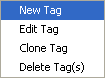
This menu provides functions to prepare tags, set the tags either in or out of range, and to modify the emulated RFID reader's capabilities. Each function is explained below:

There is also a toolbar, the Peripheral Options Toolbar, which relates directly to this menu:

The relationship between each button and a function from the menu is explained in the next table.
Some of these functions are also available in a popup menu which can be triggered by right clicking the mouse in the Tags area of the RFID peripheral panel.
Use
Peripheral Options menu functions for the RFID reader
Menu option |
Button |
Description |
New Tag |
|
It triggers the New Tag dialog to prompt the user to input all information of a new tag. This function is only available when a Data group is selected. |
Edit Tag |
|
It triggers the Edit Tag dialog to prompt the user to modify all information of an existing tag. This function is available only when an existing tag is selected. |
Clone Tag |
|
It duplicates an existing tag and triggers the Clone Tag dialog to prompt user to modify all information of the duplicated tag. This function is available only when an existing tag is selected. |
Delete Tag(s) |
|
It deletes selected tag(s). Please note that it supports multiple selections in the tag list. This function is available only when at least one tag is selected. |
Move Away |
|
It takes the selected tags and sets them as out of range of the RFID reader. This function is available only when at least one tag is selected. |
Move Near |
|
It takes the selected tags and sets them as in range of the RFID reader. This function is available only when at least one tag is selected. |
Reset |
|
It sets the RFID reader to its initial states. |
Capability… |
|
It triggers the Rfid Capability dialog to let user customize the RFID’s attributes. |


Structure
When you click on Capability…  a window with two tabs is displayed. Each tab
is explained in the next table:
a window with two tabs is displayed. Each tab
is explained in the next table:
RFID Reader's Capabilities
Category |
Description |
General |
Contains general RFID reader attributes. The state of each attribute can be modified by clicking on the attribute node selection checkbox or selecting the node and pressing the space bar. |
Tag Type |
This tab provides functionality to add, edit, delete, disable, and enable tag types. The state of each attribute can be modified by selecting the tag type and pressing either Enable or Disable button. |
Integration
The peripheral options menu contains options specific to an individual peripheral type. Menu options will vary per peripheral type.