
 TableSingleMarkableCell

You use this UI element to identify a cell in a table.
A TableSingleMarkableCell is a TableCellVariant - a cell - that can be selected. Only a restricted selection of UI elements is permitted as an editor.

This view element enables single table cells from different column and rows to be selected. A TableSingleMarkableCell must be specified in the required columns and the relevant variantKey set for the required rows. See also, Variants.
The attribute pointer of the currently selected cell is stored in markedData. The attribute pointer of a TableSingleMarkableCell is determined by the context binding path of the property attributeToMark. The context element depends on the row in which the cell was selected.
You can only use this cell type if the table’s selectionMode is set to none.
Example of the Visual Display
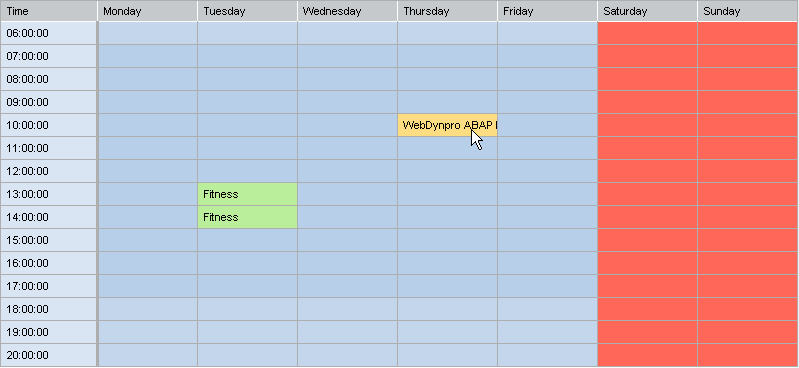
Runtime Class |
CL_WD_TABLE_SNGL_MARK_CELL |
Properties in the View Designer
Name |
Type |
Initial Value |
Bindable |
STRING |
(automatic) |
No |
|
STRING |
|
Mandatory |
|
WDUI_TABLE_CELL_DESIGN |
standard |
Yes |
|
WDUI_TABLE_COLUMN_HALIGN |
auto |
Yes |
|
WDR_EXT_ATTRIBUTE_POINTER |
|
Mandatory |
|
STRING |
|
No |
Aggregations in the View Designer
Name |
Cardinality |
Type |
0..1 |
TableMarkableCellEditor |
Other properties that can be inherited are defined in the associated higher-level classes. The associated UI elements are:
Dynamic Programming
For dynamic programming, the same properties, events, and aggregations as in the View Designer are available. Bear in mind the different spellings.
Dynamic Programming of Properties
View Designer Name |
Runtime Name |
Type |
ATTRIBUTE_TO_MARK |
STRING |
|
CELL_DESIGN |
WDUI_TABLE_CELL_DESIGN |
|
cellDesign: badvalue_dark |
CL_WD_ABSTR_MASTER_TABLE_COL=>E_CELL_DESIGN-BADVALUE_DARK |
|
cellDesign: badvalue_light |
CL_WD_ABSTR_MASTER_TABLE_COL=>E_CELL_DESIGN-BADVALUE_LIGHT |
|
cellDesign: badvalue_medium |
CL_WD_ABSTR_MASTER_TABLE_COL=>E_CELL_DESIGN-BADVALUE_MEDIUM |
|
cellDesign: calendarAqua |
CL_WD_ABSTR_MASTER_TABLE_COL=>E_CELL_DESIGN-CALENDAR_AQUA |
|
cellDesign: calendarBlue |
CL_WD_ABSTR_MASTER_TABLE_COL=>E_CELL_DESIGN-CALENDAR_BLUE |
|
cellDesign: calendarBrown |
CL_WD_ABSTR_MASTER_TABLE_COL=>E_CELL_DESIGN-CALENDAR_BROWN |
|
cellDesign: calendarGreen |
CL_WD_ABSTR_MASTER_TABLE_COL=>E_CELL_DESIGN-CALENDAR_GREEN |
|
cellDesign: calendarMetal |
CL_WD_ABSTR_MASTER_TABLE_COL=>E_CELL_DESIGN-CALENDAR_METAL |
|
cellDesign: calendarPeach |
CL_WD_ABSTR_MASTER_TABLE_COL=>E_CELL_DESIGN-CALENDAR_BLUE |
|
cellDesign: calendarPurple |
CL_WD_ABSTR_MASTER_TABLE_COL=>E_CELL_DESIGN-CALENDAR_PURPLE |
|
cellDesign: calendarRose |
CL_WD_ABSTR_MASTER_TABLE_COL=>E_CELL_DESIGN-CALENDAR_ROSE |
|
cellDesign: calendarStandard |
CL_WD_ABSTR_MASTER_TABLE_COL=>E_CELL_DESIGN-CALENDAR_STANDARD |
|
cellDesign: calendarTeal |
CL_WD_ABSTR_MASTER_TABLE_COL=>E_CELL_DESIGN-CALENDAR_TEAL |
|
cellDesign: calendarYellow |
CL_WD_ABSTR_MASTER_TABLE_COL=>E_CELL_DESIGN-CALENDAR_YELLOW |
|
cellDesign: criticalvalue_dark |
CL_WD_ABSTR_MASTER_TABLE_COL=>E_CELL_DESIGN-CRITICALVALUE_DARK |
|
cellDesign: criticalvalue_light |
CL_WD_ABSTR_MASTER_TABLE_COL=>E_CELL_DESIGN-CRITICALVALUE_LIGHT |
|
cellDesign: criticalvalue_medium |
CL_WD_ABSTR_MASTER_TABLE_COL=>E_CELL_DESIGN-CRITICALVALUE_MEDIUM |
|
cellDesign: four |
CL_WD_ABSTR_MASTER_TABLE_COL=>E_CELL_DESIGN-FOUR |
|
cellDesign: goodvalue_dark |
CL_WD_ABSTR_MASTER_TABLE_COL=>E_CELL_DESIGN-GOODVALUE_DARK |
|
cellDesign: goodvalue_light |
CL_WD_ABSTR_MASTER_TABLE_COL=>E_CELL_DESIGN-GOODVALUE_LIGHT |
|
cellDesign: goodvalue_medium |
CL_WD_ABSTR_MASTER_TABLE_COL=>E_CELL_DESIGN-GOODVALUE_MEDIUM |
|
cellDesign: group_level1 |
CL_WD_ABSTR_MASTER_TABLE_COL=>E_CELL_DESIGN-GROUP_LEVEL1 |
|
cellDesign: group_level2 |
CL_WD_ABSTR_MASTER_TABLE_COL=>E_CELL_DESIGN-GROUP_LEVEL2 |
|
cellDesign: group_level3 |
CL_WD_ABSTR_MASTER_TABLE_COL=>E_CELL_DESIGN-GROUP_LEVEL3 |
|
cellDesign: key_medium |
CL_WD_ABSTR_MASTER_TABLE_COL=>E_CELL_DESIGN-KEY_MEDIUM |
|
cellDesign: negative |
CL_WD_ABSTR_MASTER_TABLE_COL=>E_CELL_DESIGN-NEGATIVE |
|
cellDesign: one |
CL_WD_ABSTR_MASTER_TABLE_COL=>E_CELL_DESIGN-ONE |
|
cellDesign: positive |
CL_WD_ABSTR_MASTER_TABLE_COL=>E_CELL_DESIGN-POSITIVE |
|
cellDesign: standard |
CL_WD_ABSTR_MASTER_TABLE_COL=>E_CELL_DESIGN-STANDARD |
|
cellDesign: three |
CL_WD_ABSTR_MASTER_TABLE_COL=>E_CELL_DESIGN-THREE |
|
cellDesign: two |
CL_WD_ABSTR_MASTER_TABLE_COL=>E_CELL_DESIGN-TWO |
|
H_ALIGN |
WDUI_TABLE_COLUMN_HALIGN |
|
hAlign: auto |
CL_WD_TABLE_SNGL_MARK_CELL=>E_H_ALIGN-AUTO |
|
hAlign: beginOfLine |
CL_WD_TABLE_SNGL_MARK_CELL=>E_H_ALIGN-BEGIN_OF_LINE |
|
hAlign: center |
CL_WD_TABLE_SNGL_MARK_CELL=>E_H_ALIGN-CENTER |
|
hAlign: endOfLine |
CL_WD_TABLE_SNGL_MARK_CELL=>E_H_ALIGN-END_OF_LINE |
|
hAlign: forcedLeft |
CL_WD_TABLE_SNGL_MARK_CELL=>E_H_ALIGN-FORCED_LEFT |
|
hAlign: forcedRight |
CL_WD_TABLE_SNGL_MARK_CELL=>E_H_ALIGN-FORCED_RIGHT |
|
MARKED_DATA |
WDR_EXT_ATTRIBUTE_POINTER |
|
VARIANT_KEY |
STRING |
|
Dynamic Programming of Aggregations
View Designer Name |
Runtime Name |
Cardinality |
EDITOR |
0..1 |
Example
You can find an example of this UI element in the system, in Web Dynpro application WDR_TEST_TABLE.