
Defining Checkboxes

To define the input field of a parameter as a checkbox, you use the following syntax:
PARAMETERS p ...... AS CHECKBOX ......
Parameter p is created with type c and length 1. In this case, you may not use the additions TYPE and LIKE. Valid values for p are ' ' and 'X'. These values are assigned to the parameter when the user clicks the checkbox on the selection screen.
If you use
the TYPE addition to refer to a
 data type in the ABAP
Dictionary of type CHAR and length 1 for which 'X' and ' ' are defined as valid values in the domain,
the parameter automatically appears as a checkbox on the selection
screen.
data type in the ABAP
Dictionary of type CHAR and length 1 for which 'X' and ' ' are defined as valid values in the domain,
the parameter automatically appears as a checkbox on the selection
screen.

REPORT demo_sel_screen_param_checkbox .
PARAMETERS: a AS CHECKBOX,
b AS
CHECKBOX DEFAULT 'X'.
The selection screen looks as follows:
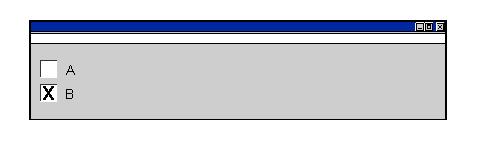
Two checkboxes appear on the left side of the selection screen with the selection text appearing on their right. Checkbox b has the default value of 'X'.