
 File
Menu
File
Menu

Definition
The File menu is used to create, open, and save a project. It also has the Exit function to close the Emulator.
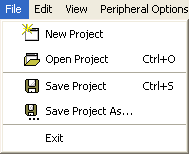
The Project Toolbar also provides access to these functions:

Use
File Menu Functions
Function |
Accelerator |
Description |
New Project |
|
Creates a new project. |
Open Project |
CTRL + O |
Opens an existing project file. |
Save Project |
CTRL + S |
Saves the current project to a file named as the project. |
Save Project As... |
|
Saves the current project to a file under a name defined by the user. |
Exit |
|
Closes and exits the emulator. |