 Verifying Digital Signatures
Some reasons for verifying a digital signature include the following:
You have received a digitally signed document and you want to verify the identity of the sender.
You want to verify the integrity of a signed document, for example, when auditing archives.
Prerequisites
You have a signed document to verify.
You know the hash algorithm that the signer used for his or her signature.
You have access to the public key of the signer.
Process
Business users indicate that they want to verify a digital signature, and the system does the rest.
 Note
Note
This may include a part of a business workflow where the system requests the verification of a digital signature before proceeding.
The figure below illustrates what happens when you verify a digital signature.
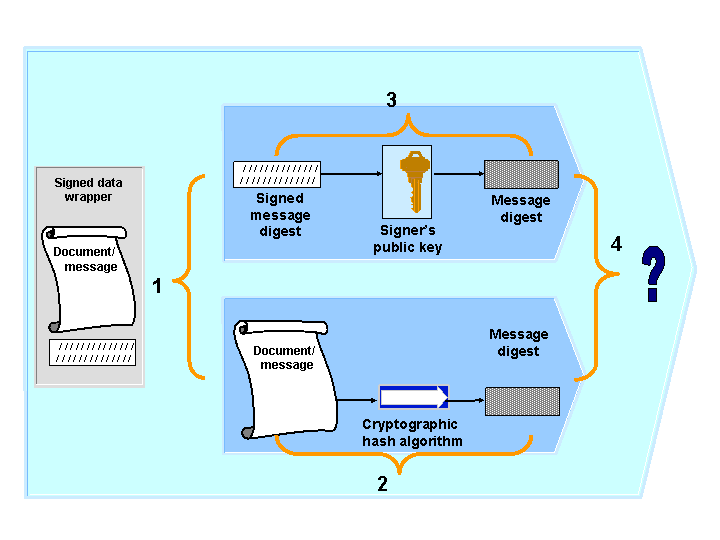
Verifying a Digital Signature
The digitally signed document is divided into its components:
The signed message digest
The document itself
The public key is applied to the signed message digest.
The result is the message digest from the original document.
The same hash algorithm that was used in the signing process is then applied to the document to be verified.
The result is the message digest for the signed document.
The two message digests are compared.
Result
The result is either the acceptance or rejection of the digital signature, based on the following conclusions:
If the message digests are identical, then:
The signer is who you think it is.
The signer is the owner of the private key that corresponds to the public key that you used to verify the signature.
The document has not been altered after being signed.
If the two message digests are not identical, then one of the following is true:
The document has been altered
The signer is not who you think it is.
The message was signed with a key other than the private key that corresponds to the public key that you used in the verification.