PanelStack 
A PanelStack contains multiple Panel UI elements. There should always be a minimum of two Panels. A Panel is always visible, and is expanded by default. The inactive Panels are available either as tabs or as menu entries.
Drag & drop is provided for the set application parameter WDUIGUIDELIND=GL20.
|
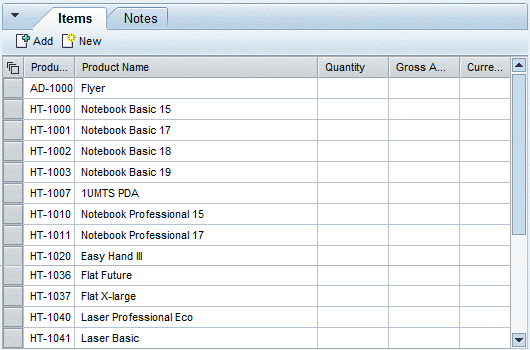 (PanelStack with two panels)
Restrictions
Note the following restrictions for Panels in a PanelStack:
You can set properties expandable and expanded, and event onToggle only for the full PanelStack. Therefore use these properties or the event for PanelStack.
You can set properties scrollingMode, width, and height only for the full PanelStack. Therefore use these properties only for PanelStack.
HeaderFunctions and HeaderToolBar are presently not supported.
Implementation Details
Runtime Class |
CL_WD_PANEL_STACK |
Name |
Type |
Initial Value |
Bindable |
|---|---|---|---|
STRING |
(automatic) |
No |
|
WDUI_PANEL_STACK_COLLAPSE_MODE |
toHorizontalLine |
Yes |
|
WDUI_CONTEXT_MENU_BEHAVIOUR |
inherit |
No |
|
WDY_MD_UI_ELEMENT_REFERENCE |
No |
||
WDY_BOOLEAN |
true |
Yes |
|
WDY_BOOLEAN |
true |
Yes |
|
STRING |
Yes |
||
WDUI_SCROLLING_MODE |
none |
Yes |
|
STRING |
Yes |
||
WDUI_TABSTRIP_SEL_CHNG_BEHVR |
auto |
No |
|
WDUI_PANEL_STACK_DESIGN |
tab |
Yes |
|
Translatable text |
Yes |
||
WDUI_VISIBILITY |
visible |
Yes |
|
STRING |
Yes |
Name |
Cardinality |
Type |
|---|---|---|
0..1 |
||
0..1 |
||
0..n |
Other properties that can be inherited are defined in the related higher-level classes. The related UI elements are:
Dynamic Programming
For dynamic programming, the same properties, events and aggregations are available as in the View Designer. Note the different spellings.
View Designer Name |
Runtime Name |
Type |
|---|---|---|
COLLAPSE_MODE |
WDUI_PANEL_STACK_COLLAPSE_MODE |
|
collapseMode: none |
CL_WD_PANEL_STACK=>E_COLLAPSE_MODE-NONE |
|
collapseMode: toHorizontalLine |
CL_WD_PANEL_STACK=>E_COLLAPSE_MODE-TO_HORIZONTAL_LINE |
|
collapseMode: toVerticalLine |
CL_WD_PANEL_STACK=>E_COLLAPSE_MODE-TO_VERTICAL_LINE |
|
CONTEXT_MENU_BEHAVIOUR |
WDUI_CONTEXT_MENU_BEHAVIOUR |
|
contextMenuBehaviour: inherit |
CL_WD_PANEL_STACK=>E_CONTEXT_MENU_BEHAVIOUR-INHERIT |
|
contextMenuBehaviour: provide |
CL_WD_PANEL_STACK=>E_CONTEXT_MENU_BEHAVIOUR-PROVIDE |
|
contextMenuBehaviour: suppress |
CL_WD_PANEL_STACK=>E_CONTEXT_MENU_BEHAVIOUR-SUPPRESS |
|
CONTEXT_MENU_ID |
WDY_MD_UI_ELEMENT_REFERENCE |
|
ENABLED |
WDY_BOOLEAN |
|
EXPANDED |
WDY_BOOLEAN |
|
HEIGHT |
STRING |
|
SCROLLING_MODE |
WDUI_SCROLLING_MODE |
|
scrollingMode: auto |
CL_WD_PANEL_STACK=>E_SCROLLING_MODE-AUTO |
|
scrollingMode: both |
CL_WD_PANEL_STACK=>E_SCROLLING_MODE-BOTH |
|
scrollingMode: none |
CL_WD_PANEL_STACK=>E_SCROLLING_MODE-NONE |
|
SELECTED_PANEL |
STRING |
|
SELECTION_CHANGE_BEHAVIOUR |
WDUI_TABSTRIP_SEL_CHNG_BEHVR |
|
selectionChangeBehaviour: auto |
CL_WD_PANEL_STACK=>E_SELECTION_CHANGE_BEHAVIOUR-AUTO |
|
selectionChangeBehaviour: manual |
CL_WD_PANEL_STACK=>E_SELECTION_CHANGE_BEHAVIOUR-MANUAL |
|
STACK_DESIGN |
WDUI_PANEL_STACK_DESIGN |
|
stackDesign: menu |
CL_WD_PANEL_STACK=>E_STACK_DESIGN-MENU |
|
stackDesign: tab |
CL_WD_PANEL_STACK=>E_STACK_DESIGN-TAB |
|
TOOLTIP |
WDY_MD_TRANSLATABLE_TEXT |
|
VISIBLE |
WDUI_VISIBILITY |
|
visible: none |
CL_WD_PANEL_STACK=>E_VISIBLE-NONE |
|
visible: visible |
CL_WD_PANEL_STACK=>E_VISIBLE-VISIBLE |
|
WIDTH |
STRING |
|
View Designer Name |
Runtime Name |
Cardinality |
|---|---|---|
DRAG_SOURCE_INFO |
0..1 |
|
DROP_TARGET_INFO |
0..1 |
|
PANELS |
0..n |
Example
You can find a test example in the system in components WDR_TEST_PANEL_STACK and DEMO_HRMNZDUI_EDIT_PAGE.